Real-Time Coaching integrates with your KnowBe4 Security Awareness Training phishing campaigns, allowing you to send SecurityTips to your users in real time after a phishing failure. This integration includes SecurityTip GIFs that show the Social Engineering Indicators, or red flags, your users missed in the exact phishing test they failed. Once enabled, these notifications will be sent from a system category named Social Engineering Indicators (SEI).
Example SEI SecurityTip
For an example of how a generated Social Engineering Indicators (SEI) SecurityTip might look, see the image below:

Enable or Disable Real-Time Coaching with SEI
To enable or disable Real-Time Coaching with Social Engineering Indicators (SEI) for phishing campaigns, see the subsections below.
New Phishing Campaigns
To enable Real-Time Coaching with SEI for a new phishing campaign, follow these steps:
- Log in to your KnowBe4 SAT console.
- Navigate to your Phishing > Campaigns tab.
- Select + Create a Phishing Campaign.
- Configure your preferred campaign settings.
- Enable the option to Send SecurityTips that reveal missed Social Engineering Indicators for phishing failures.
- Select Create Campaign.
Existing Phishing Campaigns
To enable or disable Real-Time Coaching with SEI for an existing phishing campaign, follow these steps:
- Log in to your KnowBe4 SAT console.
- Navigate to your Phishing > Campaigns tab.
- Find your preferred campaign in the Name column. To the right of the campaign's row, select the three dots icon, then select Edit from the drop-down menu. The campaign configuration page will display.
- Enable or disable the option to Send SecurityTips that reveal missed Social Engineering Indicators for phishing failures.
- Select Update Campaign at the bottom of the page.
AIDA Orchestration Phishing Campaigns
To enable or disable Real-Time Coaching with SEI for AIDA Orchestration phishing campaigns, follow these steps:
- Log in to your KnowBe4 SAT console.
- Navigate to Orchestration > Remedial Training.
- Enable or disable AIDA-recommended Real-Time Coaching.
Manage the SEI Category
To manage the Social Engineering Indicators (SEI) category in Real-Time Coaching, follow these steps:
- Log in to your KnowBe4 SAT console.
- Navigate to Coaching > Real-Time Coaching.
- Locate and select the Social Engineering Indicators (SEI) card.
-
To review activity for this category, see our Categories Guide. To edit the category, select Edit Coaching. For more information on editing the category, see the screenshot and list below.
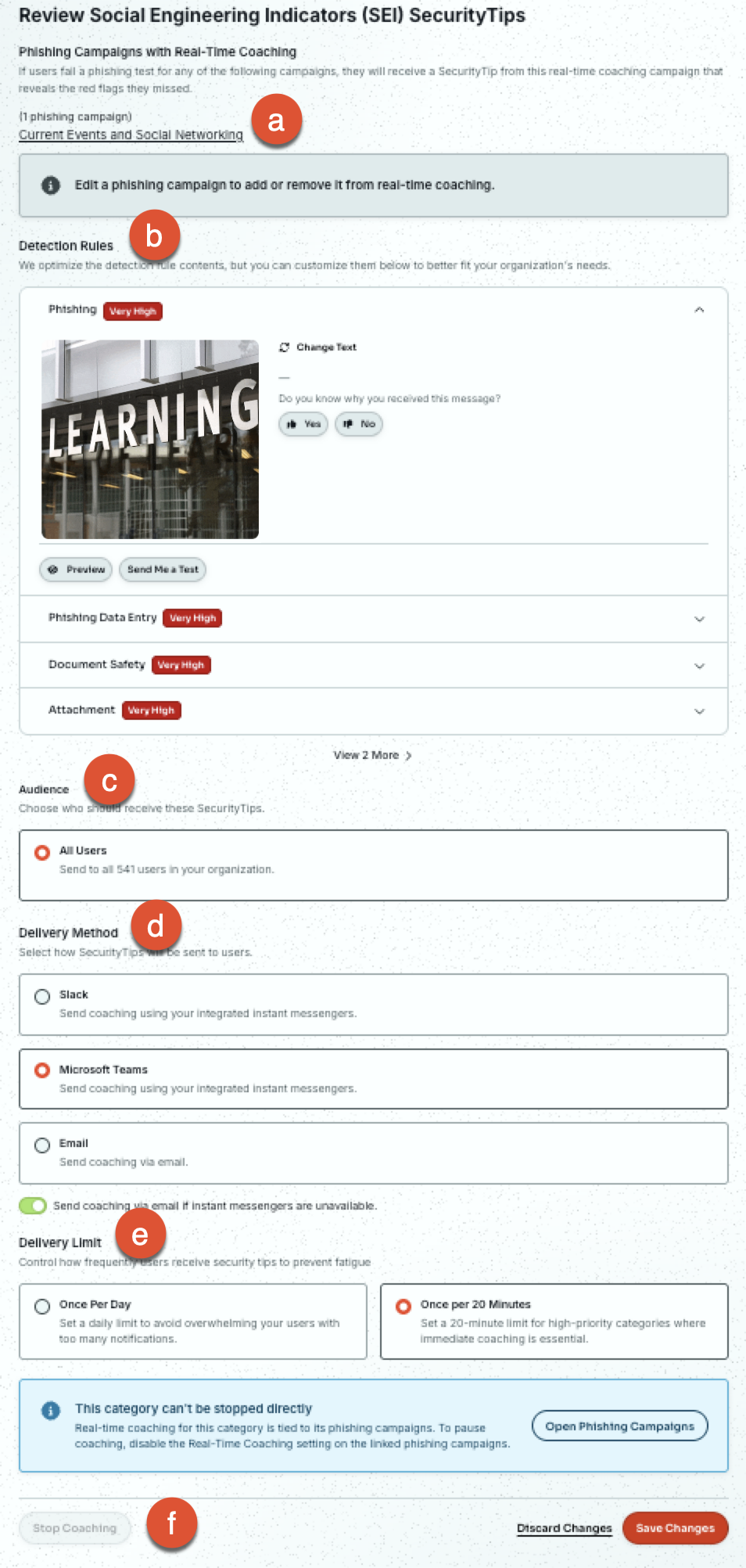
- Phishing Campaigns with Real-Time Coaching: This section lists all phishing campaigns with Real-Time Coaching enabled. Select a campaign name to access its individual settings.
-
Detection Rules: Use this section to configure your individual detection rules for this category. To expand options for a detection rule, select its name.
- SecurityTip Media: A unique GIF is automatically generated for each detection in this system category. For an example of what the SecurityTip GIF looks like, see our example.
- Change Text: Change the text notification template sent with the SecurityTip.
- Preview: Display a preview of how the SecurityTip will look when sent to your user.
-
Send Me a Test: Send a test version of the SecurityTip to a user of your choice.
Note:The email address you provide for this test must be integrated with your selected SecurityTip Delivery Method. If your delivery method includes Email, the email address you provide for this test must be an active user in your KnowBe4 SAT console.
- Audience: For this system category, coaching is enabled for All Users and can't be changed.
- Delivery Method: Select your preferred real-time delivery method for delivering SecurityTips to your users. We also recommend enabling Send coaching via email if instant messengers are unavailable to ensure successful delivery.
-
Delivery Limit: Select how often you want SecurityTips to be sent to your users.
Note:Real-Time Coaching generates and sends a SecurityTip GIF as soon as it detects your user's first failure in a simulated phishing test, and doesn't send another tip for later failures in the same test. Generating the SecurityTip GIF typically takes about one minute.- Limit to one SecurityTip every 20 minutes: Users won't receive more than one tip per 20 minutes for this category.
- Limit to one SecurityTip per day: Users won't receive more than one tip per 24 hours for this category.
- Stop Coaching: To stop coaching for this category, Real-Time Coaching must be disabled for each phishing campaign or for all AIDA Orchestration phishing campaigns.
For more information on Real-Time Coaching categories, see our guide.