Overview
This article shows you common use cases and examples of how to build patterns with the Custom Pattern Builder so Prevent can monitor sensitive information types in outbound emails. Each use case includes a short business scenario, a sample pattern structure, and example values that the pattern matches.
The Custom Pattern Builder is part of the self-serve content analysis configuration that's available to all Prevent customers. You can create a pattern, test it against real examples, and apply it to your policies without involving professional services.
Requirements
See the required items below:
- You must be an admin in the Prevent console.
- Your organization must have Prevent enabled.
- You must have at least one Misdirected Content policy created or available to attach the custom pattern to.
How to Use This Article
Each use case below follows the same structure:
- Scenario: The business context and why monitoring matters.
- Pattern structure: The components you add in the Pattern Builder, including any pattern groups.
- Example matches: Sample values that the pattern will detect.
- Test inputs: Values you can paste into the Pattern Tester to confirm your pattern works as expected.
You can adapt any of these examples to fit your organization's identifier formats. We recommend testing several real-world examples in the Pattern Tester field before saving your pattern.
Use Case 1: Legal Matter IDs
This section will show you how to create custom patterns for legal matter IDs.
Scenario
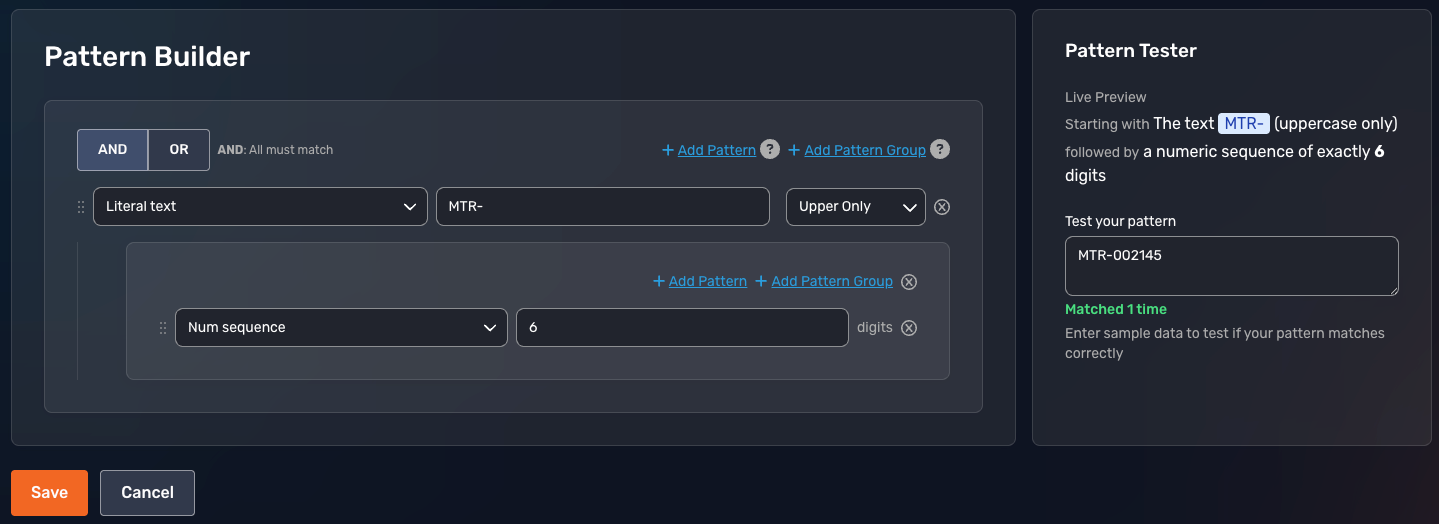
Your law firm uses internal Matter IDs to track client cases. These IDs follow the format MTR- followed by six digits (such as MTR-002145). You want Prevent to flag outbound emails that contain a Matter ID being sent to an anomalous recipient, since these IDs often appear alongside privileged client information.
Pattern Structure
The pattern structure for this use case is shown below:
- Pattern Name: Legal Matter ID
- Data Type: Legal
- Description: Internal Matter IDs used to identify client cases.
- Pattern: Literal text "MTR-"
- Pattern Group: Num sequence "6" digits
Example Matches
The example matches for this use case are shown below:
- MTR-002145
- MTR-998001
- MTR-100099
Test Inputs
The text inputs for this use case are shown below:
- Valid: MTR-002145
- Invalid: MTR-2145 (only four digits)
- Invalid: MAT-002145 (wrong prefix)
Use Case 2: Clinical Trial IDs
This section will show you how to create custom patterns for clinical trial IDs.
Scenario
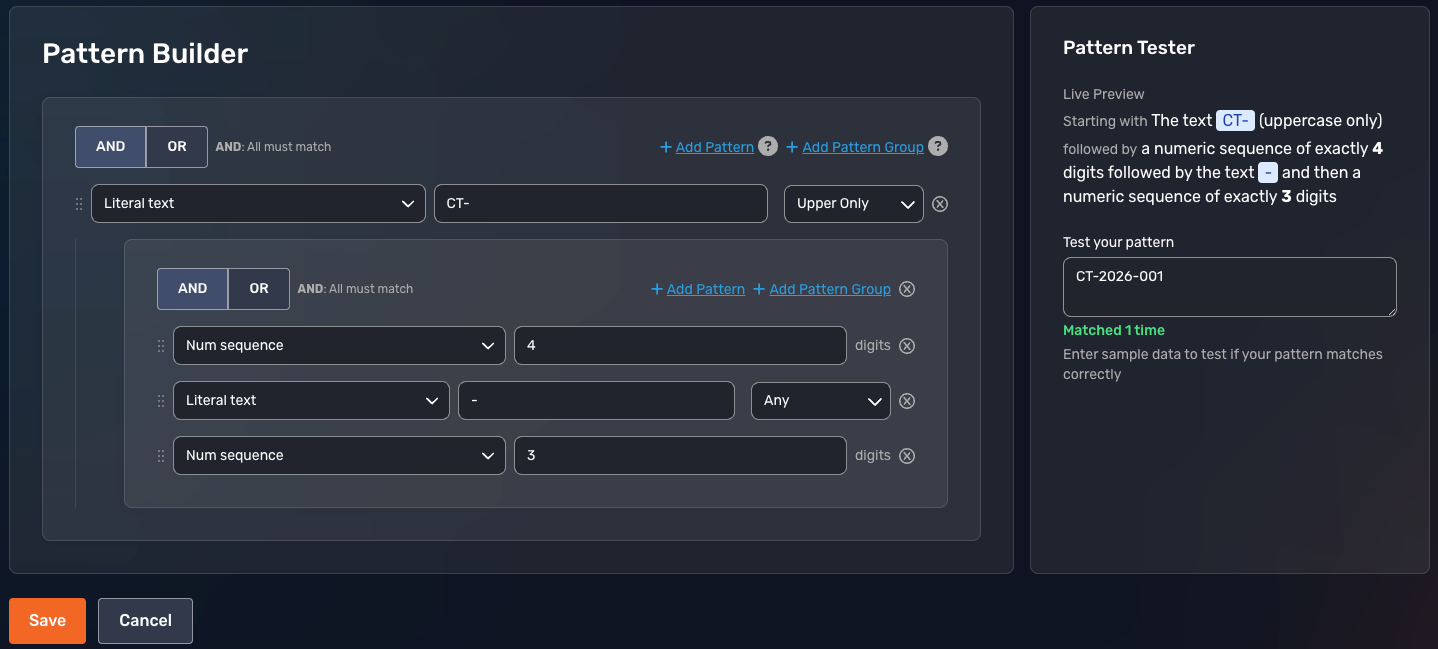
Your research team participates in multiple clinical trials. Each trial uses a sponsor-provided ID in the format CT- followed by four digits, a hyphen, and three digits (such as CT-2026-001). You want Prevent to monitor for these IDs since they often appear in emails containing trial participant data.
Pattern Structure
The pattern structure for this use case is shown below:
- Pattern Name: Clinical Trial ID
- Data Type: Medical
- Description: Sponsor-provided identifiers for active clinical trials.
- Pattern: Literal text "CT-"
- Pattern Group: Number sequence "4"
- Pattern Group: Literal text "-"
- Pattern Group: Number sequence "3"
Example Matches
The example matches for this use case are shown below:
- CT-2026-001
- CT-2024-150
- CT-2025-099
Test Inputs
The text inputs for this use case are shown below:
- Valid: CT-2026-001
- Invalid: CT-26-001 (year segment too short)
- Invalid: CT-2026-1 (final segment too short)
Use Case 3: Insurance Claim Numbers
This section will show you how to create custom patterns for claim numbers.
Scenario
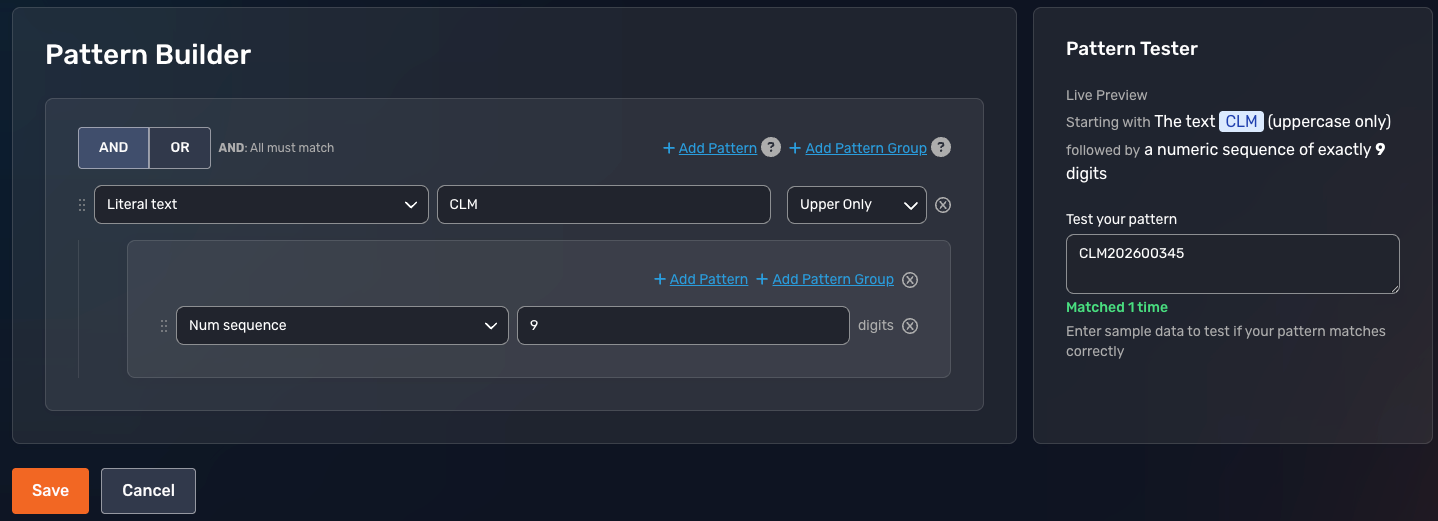
Your insurance organization uses claim numbers in the format CLM followed by a four-digit year and a five-digit sequence (such as CLM202600345). You want Prevent to detect these claim numbers in outbound email to reduce the risk of accidentally sharing claim details with the wrong recipient.
Pattern Structure
The pattern structure for this use case is shown below:
- Pattern Name: Insurance Claim Number
- Data Type: Insurance
- Description: Internal claim identifiers used by our claims department.
- Pattern: Literal text "CLM"
- Pattern Group: Number sequence "9"
Example Matches
The example matches for this use case are shown below:
- CLM202600345
- CLM202412001
- CLM202599999
Test Inputs
The text inputs for this use case are shown below:
- Valid: CLM202600345
- Invalid: CLM-202600345 (extra hyphen)
- Invalid: CLM12345 (too few digits)
Use Case 4: Manufacturing Part or Serial Numbers
This section will show you how to create custom patterns for manufacturing part or serial numbers.
Scenario
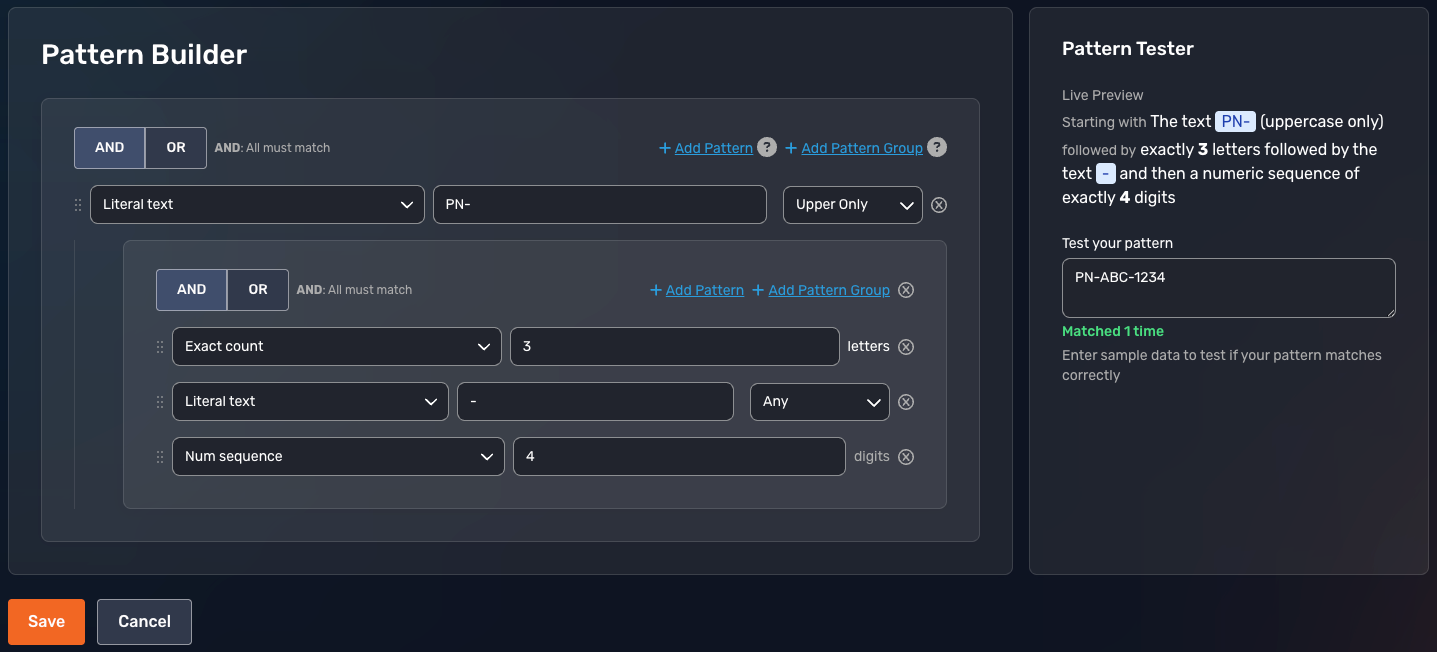
Your manufacturing organization uses internal part numbers in the format PN- followed by three letters and four digits (such as PN-ABC-1234). You want Prevent to flag these in outbound emails since they may appear alongside intellectual property and proprietary specifications.
Pattern Structure
The pattern structure for this use case is shown below:
- Pattern Name: Manufacturing Part Number
- Data Type: Manufacturing
- Description: Internal part identifiers used in our production system.
- Pattern: Literal text "PN-"
- Pattern Group: Exact count "3"
- Pattern Group: Literal text "-"
- Pattern Group: Number sequence "4"
Example Matches
The example matches for this use case are shown below:
- PN-ABC-1234
- PN-XYZ-9876
- PN-DEF-0001
Test Inputs
The text inputs for this use case are shown below:
- Valid: PN-ABC-1234
- Invalid: PN-AB-1234 (only two letters)
- Invalid: PN-ABC1234 (missing hyphen)
Tips for Building Effective Patterns
Here are some tips for building effective patterns:
- Start specific, then broaden: Begin with a literal prefix or anchor (such as MTR-, ACCT-, or CASE-) so your pattern doesn't over-match unrelated text.
- Test multiple variations: Use the Pattern Tester to confirm your pattern matches several real examples before saving. Try including invalid examples to confirm the pattern doesn't match those, too.
- Name patterns clearly: Use a descriptive Data Type name so other admins can identify what the pattern matches at a glance.
- Document the pattern: Add a short Description that explains where the identifier appears in your business and why you're monitoring for it.
- Review patterns regularly: If your organization changes its identifier format, update the pattern by editing it in the Custom Information section of the Library.
Frequently Asked Questions
Can I edit a pattern after I save it?
Yes. You can edit or delete a saved pattern at any time. For details, see our Prevent - Policies and Library User Guide.
Will Prevent flag every email that contains my pattern?
No. Prevent only triggers when your pattern is detected in an outbound email that meets the conditions of an associated policy, such as anomalous recipient detection. The pattern alone doesn't flag emails.
What's the difference between a custom pattern and a preconfigured information type?
Preconfigured information types cover common categories like credit cards, Social Security numbers, and passport numbers. Custom patterns let you monitor identifiers unique to your organization, such as internal Matter IDs or part numbers.