The SecurityTips subtab is where you manage SecurityTip content and notification templates used in Real-Time Coaching categories. SecurityTips can be used to coach your users about their risky activity and how to avoid it in the future.
You can leverage pre-existing SecurityTip content or upload custom graphics. SecurityTips are automatically localized to match the recipient's training language. For instructions on uploading custom graphics, see our Upload Custom SecurityTip Graphics article.

Each SecurityTip content item is represented by a card on the Media Catalog page. SecurityTips are available in image, GIF, or video formats. A GIF icon indicates the GIF format, a graphic icon indicates the graphic format, and a video icon indicates the video format. Selecting a card allows you to preview the SecurityTip content.
Media Catalog
The Media Catalog page includes several interactive elements for filtering and managing SecurityTip media content. For more information, see the screenshot and list below:
- Media Type: Filter media by type.
-
Media Source: Choose between System media and Custom uploaded media.
Note:Only custom images are currently supported for SecurityTips. - Topics: Filter media by category.
- Languages: Filter media by language.
- Search: Enter a keyword used in the media title to filter your results.
- Media Type label: Indicates whether the media is available in image, GIF, or video format.
- Title label: Displays the title of the SecurityTip media.
- Language label: Displays the number of available languages for the SecurityTip media.
- Topics label: Displays the category for the SecurityTip media. We offer SecurityTip media for several categories, such as Malware, Social Media, and Ransomware.
- + New SecurityTip: Create your own custom SecurityTip for use in coaching.
Notification Templates
The Notification Templates page lets you manage and view the text templates used in SecurityTips. For more information, see the screenshot and list below:
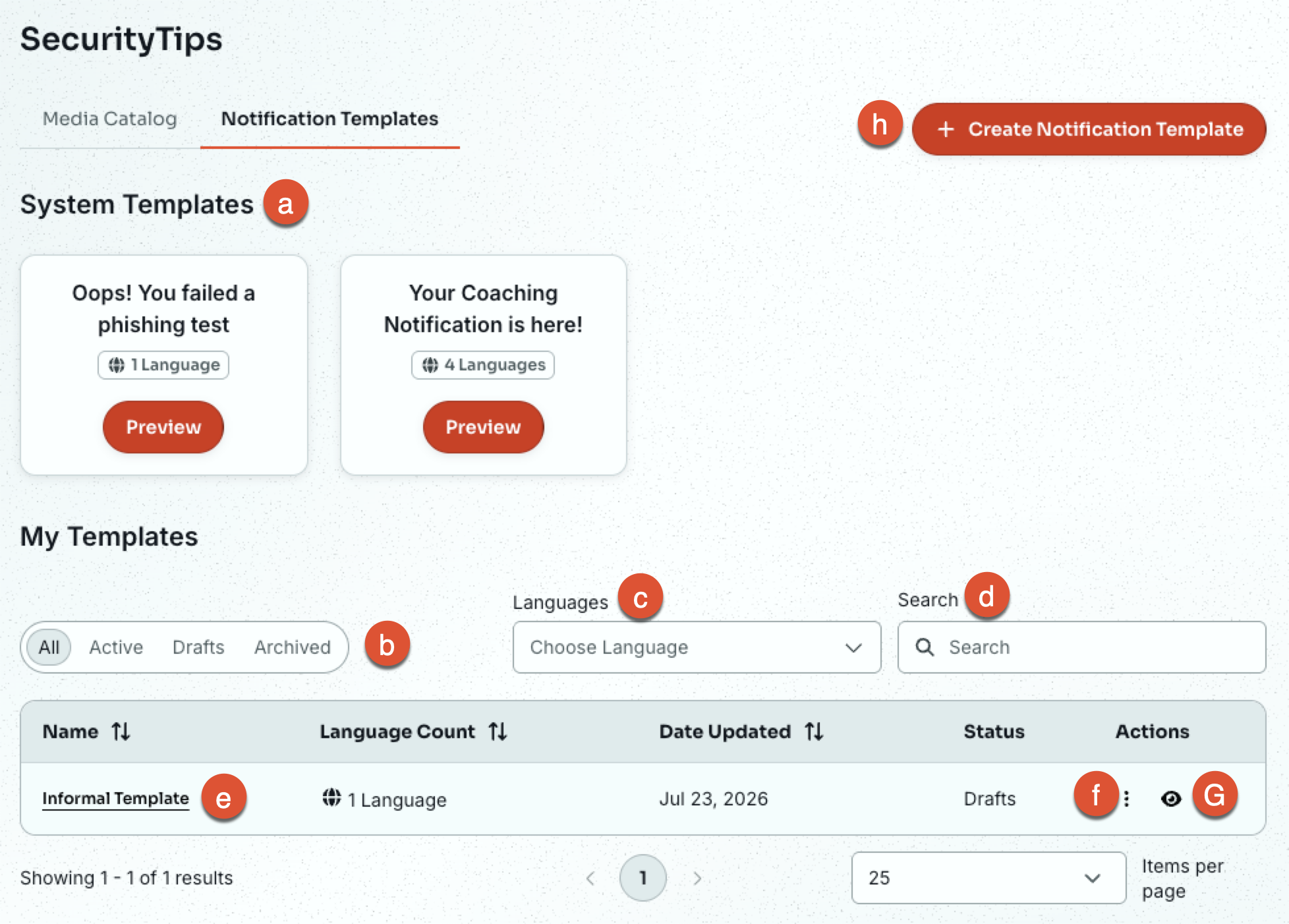
- System Templates: The section contains all the KnowBe4 system text templates, designed to cover a wide range of common coaching scenarios. Each system template card displays the name, languages the template is available for, and a Preview button to view what the text looks like in a message quickly.
- Status: Filter your custom templates by their status.
- Languages: Filter your custom templates by the languages they are available in.
- Search: Search for specific custom templates using keywords.
- Template Name: Select the name of a custom template to rename and modify the template, as well as add and remove additional languages.
- Actions: Quickly access management options for your custom template. Options included Clone and Delete.
- Preview: Select the eye icon to preview the template quickly.
-
Create Notification Template: Create your own custom notification template for use in SecurityTips.