Our Defend-KnowBe4 integration can help you create targeted training campaigns for your users. You can use this integration combined with phishing campaigns and Smart Groups to automatically identify users who open more than a certain number of phishing email attachments in a set period, such as over five social engineering events in one month. Then, you can enroll your users in extra training campaigns based on which type of phishing custom events they’re most prone to failing, such as social engineering.
We recommend automating remedial training for users who fail a Phishing Security Test (PST). When users fail a PST, they’ll be automatically added to a Smart Group and assigned remedial training content of your choice.
For example, if you want to train certain users on dangerous emails because they selected a dangerous link in an email, you can follow the steps in the sections below to train them.
Create a Custom Event Smart Group
To create a Smart Group using the Custom Event criteria, follow the steps below:
- Log in to your KnowBe4 console.
- Navigate to Users > Groups > + Create New Group.
- Enter a Group Name and select the Make this a Smart Group check box.
- Select Create Group.
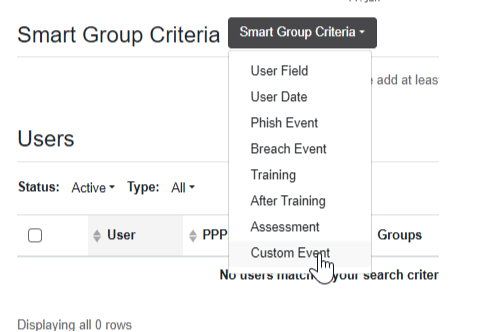
- In the Smart Group Criteria drop-down menu, select Custom Event.
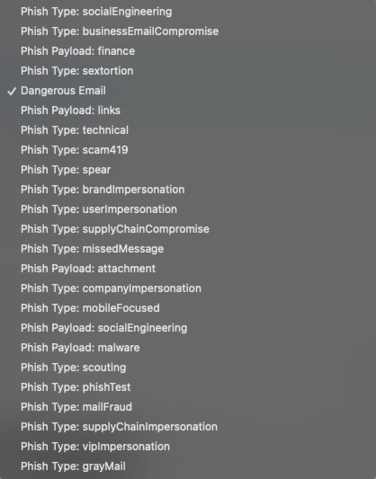
- Select your Custom Event. For more information about each event, see the All Phishes section below.
- Set your event Count and Time Frame.
- Select Save. The group will automatically populate with any matching users. The group is now live and will continue to match more users as they experience threats.
Create a Phishing Campaign
Next, create a phishing campaign. For more information, see our Create and Manage Phishing Campaigns article.
Create a Training Campaign
Finally, create a training campaign using the Smart Groups that you configured above. For more information, see the Create a Training Campaign section in our Training Campaigns Guide.
Common Phishes and Recommended Training
Reference the subsections below to help you select training content for your users based on their custom events for phishing types.
Spear Phish
Spear phishing is a targeted attack on one or more individuals within an organization. This attack usually has knowledge of their roles in their organization.
Custom Event: Spear
Related Training
-
Spear Phishing in Action
- Duration: 5 minutes
- Type: Mobile-First Module
- Languages: 35 languages
- Release: June 2021
- Content: Uses a real-world example to show how spear phishing works, highlighting warning signs and demonstrating that it targets specific individuals using advanced methods.
-
Targeted Phishing: How Spear Phishing Works
- Duration: 2 minutes
- Type: Video Module
- Languages: 12 languages
- Release: March 2020
- Content: Teaches how to organize a targeted attack and obtain specific information for a successful spear phishing attempt.
Social Engineering
Social engineering is a phishing attempt using emotional or deceptive language to convince the recipient to reveal confidential information or select an unsafe link.
Custom Event: socialEngineering
Related Training
-
Top 5 Security Awareness Fundamentals
- Duration: 5 minutes
- Type: Mobile-First Module
- Languages: 35 languages
- Release: September 2021, updated September 2024
- Content: Condenses security awareness principles into five fundamental groups.
-
Mobile Essentials: Social Engineering
- Duration: 8 minutes
- Type: Mobile-First Module
- Languages: 35 languages
- Release: August 2022
- Content: Demonstrates phishing, vishing, tailgating, and USB attacks by showing tactics involving infiltration, manipulation, and data theft through social engineering.
Mobile
This type of phish is aimed specifically at mobile device users, as it exploits some mobile weaknesses.
Custom Event: mobileFocused
Related Training
-
Securing Mobile Devices
- Duration: 5 minutes
- Type: Mobile-First Module
- Languages: 35 languages
- Release: August 2021
- Content: This module reviews common threats presenting professional and personal security challenges related to smartphones, tablets, and other devices.
-
Protecting Your Devices
- Duration: 5 minutes
- Type: Mobile-First Module
- Languages: 35 languages
- Release: October 2021
- Content: This module teaches employees about firewalls, antivirus scanners, software updates, device risks, and security habits.
-
Information Security on Mobile Devices
- Duration: 5 minutes
- Type: Training Module
- Languages: 18 languages
- Release: April 2021
Content: This module explains how to protect devices and data from risks. It covers access authorization, data privacy settings, and using Wi-Fi or Bluetooth safely.
Financial Payload
This type of phish attempts to make you send money or financial details to cybercriminals.
Custom Event: finance
Related Training
-
Security for Finance
- Duration: 7 minutes
- Type: Mobile-First Module
- Languages: 37 languages
- Release: October 2021
- Content: This module teaches employees how to stop financial data leaks. It covers relevant regulations and lists easy steps for keeping financial data secure.
-
Fraud Awareness and Prevention
- Duration: 6 minutes
- Type: Mobile-First Module
- Languages: 34 languages
- Release: May 2021
- Content: This module shows common types of fraud. It identifies red flags for fraud and demonstrates how to prevent fraud, emphasizing fraud’s negative consequences on an organization’s reputation, morale, and finances.
Attachment Payload
This type of phish has an email that contains a malicious attachment, which will attempt to steal credentials or install malware on your device’s system when opened or activated.
Custom Event: attachment
Related Training
-
Security Moments Series: Spot the Bad Attachment
- Duration: 3 minutes
- Type: Training Module
- Languages: 13 languages
- Release: March 2018
- Content: This module shows users how to spot malicious email attachments and the importance of not opening those attachments, as they can install malware and compromise a network.
-
Links and Attachments: Think Before You Click
- Duration: 10 minutes
- Type: Training Module
- Languages: 12 languages
- Release: November 2022
- Content: This module shows how cybercriminals use links and attachments to target their victims, and the negative consequences of selecting those links and attachments. It also provides digestible safety tips so users can more easily recognize malicious content.
All Phishes
Reference the table below to learn about all types of phishing attacks we have training on:
| Phish Type | Definition | Event Type (Defend Smart Group) |
|
419 Scam
|
Promises to share a large amount of money with the victim, in return for a small upfront payment. |
Phish Type: scam419
|
| Attachment | Contains a malicious attachment that, when opened or activated, will attempt to steal credentials or install malware onto your system. | Phish Type: attachment |
| Brand Impersonation | Attempt to imitate a brand. | Phish Type: brandImpersonation |
| Business Email Compromise | Verified business email account sends malicious content. | Phish Type: businessEmailCompromise |
| Company Impersonation | Attempt to imitate an organization. | Phish Type: companyImpersonation |
| Dangerous Email (General) | General category for dangerous email threats. | Phish Type: Dangerous Email |
| Financial | Attempts to entice you to send money or financial information. | Phish Payload: finance |
| Links | Contains a link that leads to a malicious site. | Phish Payload: links |
| Mail Fraud | Impersonates a physical mail delivery organization. | Phish Type: mailFraud |
| Malware | Runs malicious code on an attachment. | Phish Payload: malware |
| Missed Message | Indicates the target has not received important information. | Phish Type: missedMessage |
|
Mobile |
Specifically targets mobile device users and takes advantage of the weaknesses of the device. | Phish Type: mobileFocused |
| Phish Test | Email sent as a phishing test. | Phish Type: phishTest |
| Scouting | Validates an email address and identifies what email security is in place. Usually without a payload. | Phish Type: scouting |
| Sextortion | Threatens to leak sexual information, such as images or videos. | Phish Type: sextortion |
| Social Engineering | Contains emotional or deceptive language. | Phish Payload: socialEngineering |
| Spear Phish | Targeted attack on an individual or group of individuals, usually with knowledge of their roles within the organization. | Phish Type: spear |
| Supply Chain Compromise | One of your users’ verified organization email accounts sends two-way communication and malicious content. |
Phish Type: supplyChainCompromise
|
|
Supply Chain Impersonation |
Sender impersonates an account that has had significant two-way traffic with a user at your organization. | Phish Type: supplyChainImpersonation |
| Technical | Complex attacks specifically designed to evade existing defensive mail filtering. | Phish Type: technical |
| User Impersonation | Sender impersonates a user at your organization. | Phish Type: userImpersonation |
| VIP Impersonation | Sender impersonates a user in a position of significant influence or status in your organization. |
Phish Type: vipImpersonation |
Additional Resources
For additional resources about training, see the Recommended Training Plan PDF file or the KnowBe4 Security Awareness Training Library.