You can integrate your Dashlane Dashlane (link opens in new window) platform into your KSAT console. This integration allows you to track how your team members use the Dashlane platform and automatically sends select activity logs to KnowBe4. It also notifies KnowBe4 when a security risk is detected, allowing real-time coaching to be sent to the end user.
Before You Connect Dashlane to Your KSAT Console
Before integrating Dashlane into your KSAT console, you must find your API address and create a User API Event key. Follow the steps below to complete these actions.
-
Your API address depends on where your KnowBe4 account is located. Please see the table below to find the API address for your region. Log in to your KSAT console as an admin.
Region Base URL US https://us.api.knowbe4.com CA https://ca.api.knowbe4.com EU https://eu.api.knowbe4.com UK https://uk.api.knowbe4.com DE https://de.api.knowbe4.com - Navigate to Account Settings in the top-right corner under your account’s email address.
- In Account Settings, navigate to Account Integrations.
- Under Account Integrations, navigate to API > User Event API.
Connect Dashlane to Your KSAT Console
You can connect your Dashlane platform to your KSAT console by following the steps below.
- Log in to your Dashlane platform as an admin.
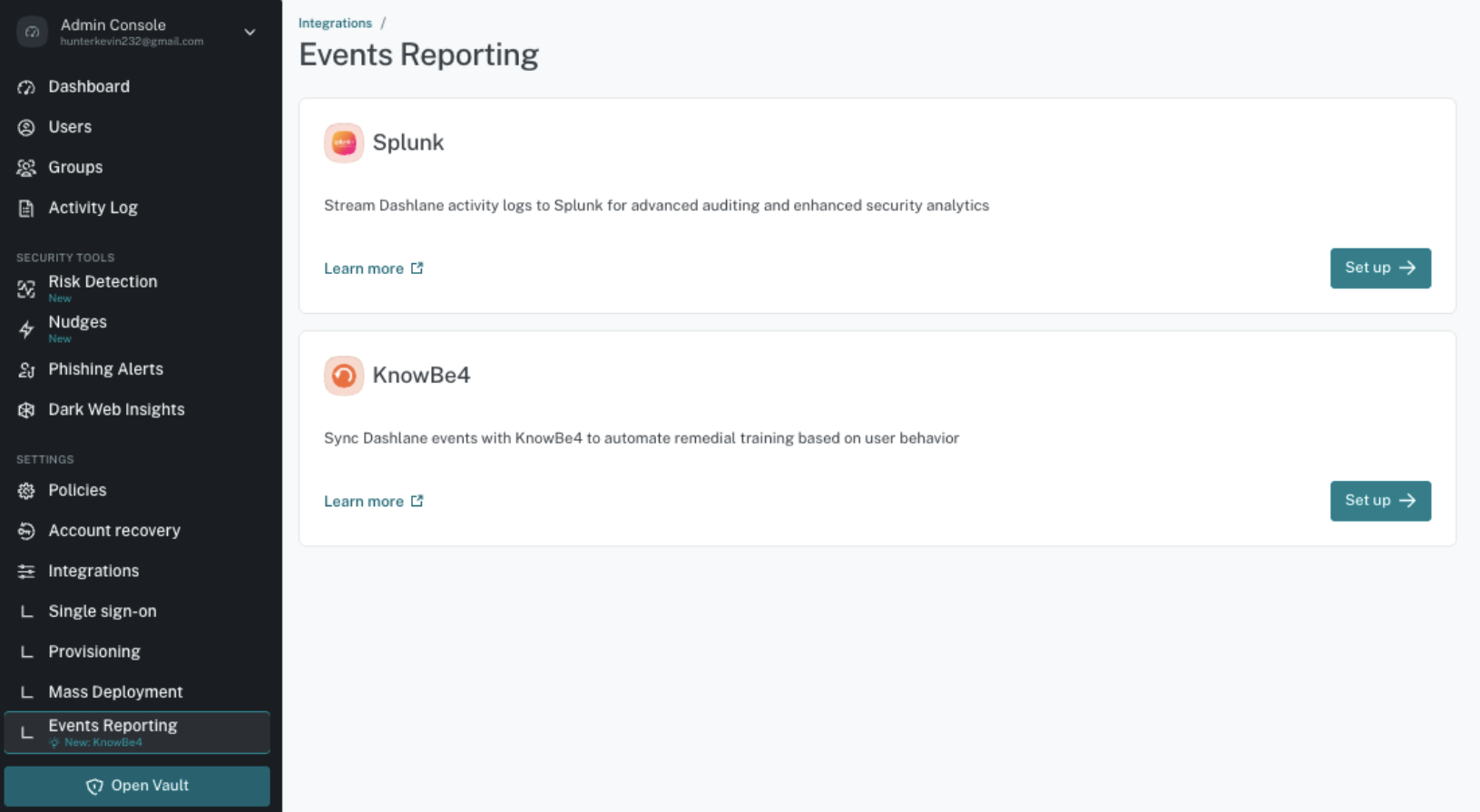
- In your Admin Console, navigate to Integrations > Events Reporting.
-
In the KnowBe4 section, select Set up.
- Select the region that matches your base URL in the Region URL drop-down menu.
- Enter the User Event API key from the previous steps in the User Event API Key field.
- Select Save.
-
Activate the KnowBe4 integration by using the toggle.
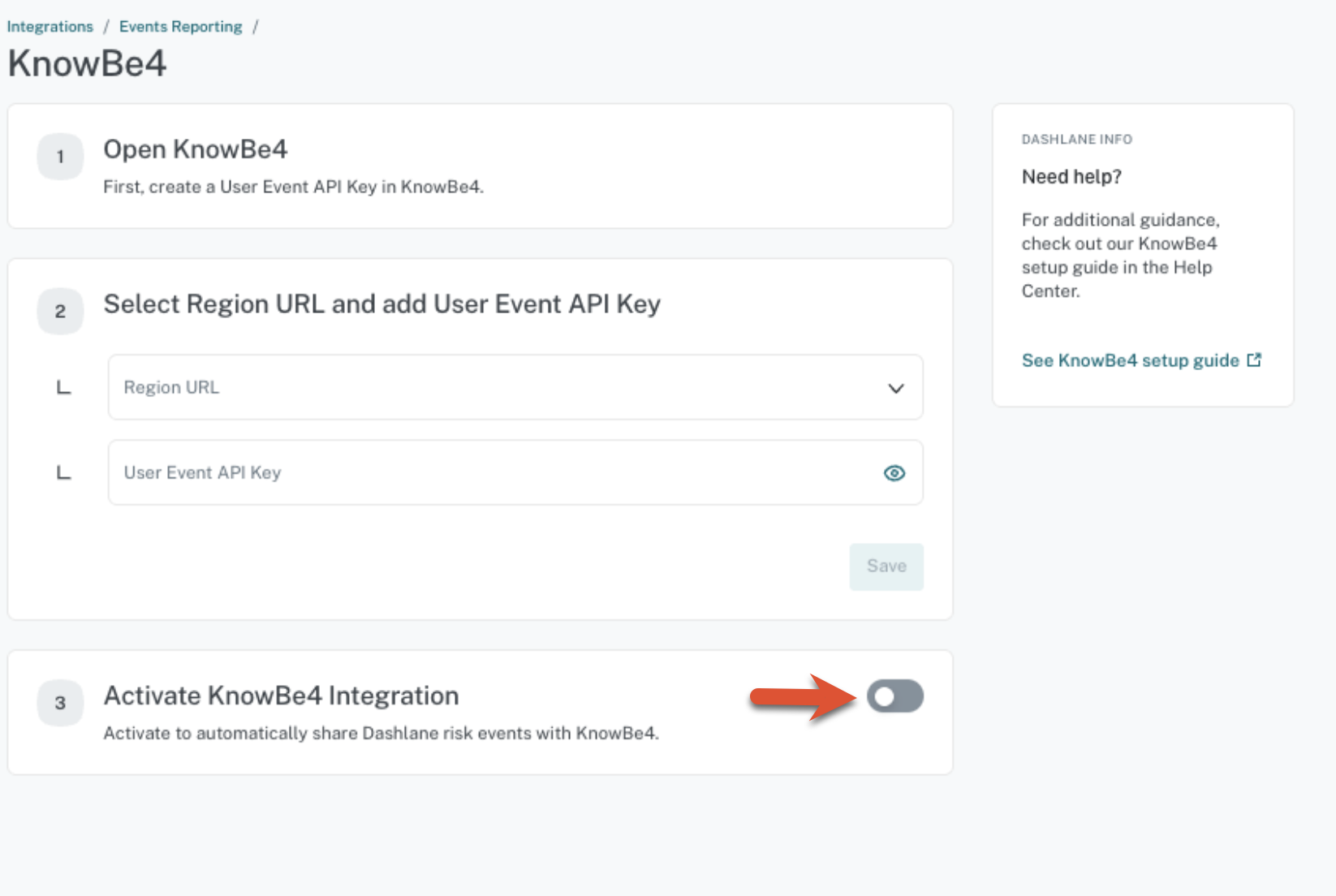
The Last Sync status will remain Pending until the first Dashlane event is sent to KnowBe4.
Dashlane Activity Logs Sent to KSAT
When you have completed setting up the integration, Dashlane will send activity logs activity logs (link opens in new window) for real in-browser phishing alerts, weak or compromised password use, nudges, and dark web alerts. Here are activity log entries you may receive:
| Activity Log | Description | Professional Plan |
|---|---|---|
| Credential risk detection Credential risk detection (link opens in new window) |
An employee logs in to a website with a weak password using Dashlane An employee logs in to a website with a compromised password while not logged in to Dashlane An employee logs in to a website with a weak password while not logged in to Dashlane An employee logs in to a website with a compromised password while not having a Dashlane account An employee logs in to a website with a weak password while not having a Dashlane account |
Omnix |
| Vault phishing alerts Vault phishing alerts (link opens in new window) |
A plan member has received a phishing alert A plan member has entered a password after getting a phishing alert A plan member has entered a password on a risky site |
Business and Omnix |
| AI phishing alerts AI phishing alerts (link opens in new window) |
An employee dismissed an AI phishing alert An employee accepted an AI phishing alert An employee entered a password on a site they received an alert about |
Omnix |
| In-browser nudges In-browser nudges (link opens in new window) |
An employee received an in-browser nudge prompting them to change an at-risk password An employee changed an at-risk password following an in-browser nudge |
Omnix |
If you experience issues integrating Dashlane with your KSAT console, please contact Dashlane’s technical support Dashlane’s technical support (link opens in new window).
Create Training Campaigns Using Dashlane
You can set up and automate training using the KnowBe4 integration in Dashlane by creating Smart Groups. For more information on creating Smart Groups that correspond to events in Dashlane and on automating training, see our Smart Groups Training Automation Guide and Dashlane’s Automation: Activating smart groups and creating training campaigns article.
You can upload Dashlane’s own training video, Maintaining Credential Security in your organization, to your KnowBe4 ModStore when you create training campaigns about credential security. For more information about uploading custom training content, see our Upload Custom Training Content article.