Observed every October, Cybersecurity Awareness Month provides an opportunity to raise awareness and improve your organization's security culture. You can teach and encourage your users all month long by following the Weekly Planners found in our Cybersecurity Awareness Month Resource Kits.
You can find links to our available resource kits in the table below:
| Subscription Level | Resource Kit Link |
|---|---|
| Gold, Platinum, or SAT Foundation | Cybersecurity Awareness Month Resource Kit (link opens in new window) |
| Diamond or SAT Advanced | Cybersecurity Awareness Month Resource Kit (link opens in new window) |
In your KnowBe4 console, you’ll find four new phishing templates and two new landing pages, which have been localized into all of our supported languages (link opens in new window). These resources relate to the topic covered in each week of the Weekly Planner. We recommend using these phishing templates and landing pages together for a cohesive and engaging learning experience. To increase participation with your users, we recommend enabling the Leaderboard. For more information, see the Learner Experience (LX) section of our KnowBe4 Console Account Settings: Training article.
To learn more about these resources and how to share them with your users, see the section below.
Cybersecurity Awareness Month Landing Pages and Phishing Templates
For Cybersecurity Awareness Month, we created four phishing templates and two new landing pages. Each phishing template is an example of a common cybersecurity threat, such as social engineering and malicious URLs. Each landing page teaches users how to protect themselves and your organization from these threats.
If you would like to preview the Cybersecurity Awareness Month phishing templates, follow the steps below:
- Navigate to Phishing > Phishing Templates.
- Select System Templates.
- Copy a title from the list below to search in the search bar on the right side of the page for the phishing template you would like to preview:
- Microsoft: Upgrade to the New Microsoft Office (Link)
- OpenAI: You have been invited to a ChatGPT Team (Link)
- IT: New Password Request (Link) (Spoofs Domain)
- Incident Today (Link) (Spoofs Domain)
- Once you find the phishing template, select the eye icon next to the title to preview it.
If you would like to preview Cybersecurity Awareness Month landing pages, follow the steps below:
- Navigate to Phishing > Landing Pages.
- Select System Landing Pages. Copy a title from the list below to search in the search bar on the right side of the page for the landing page you would like to preview:
- Browser Language Detecting: Workforce Risk Division Escape Room
- Browser Language Detecting: Workforce Risk Division Case Files
- Once you find the landing page, select the eye icon next to the title to preview it.
These phishing templates and landing pages are designed to be used together in four phishing security tests, one for each week of Cybersecurity Awareness Month. To create these phishing security tests, navigate to the Phishing tab and select + Create Phishing Campaign. Then, select the recommended settings below and customize the campaign as needed.
-
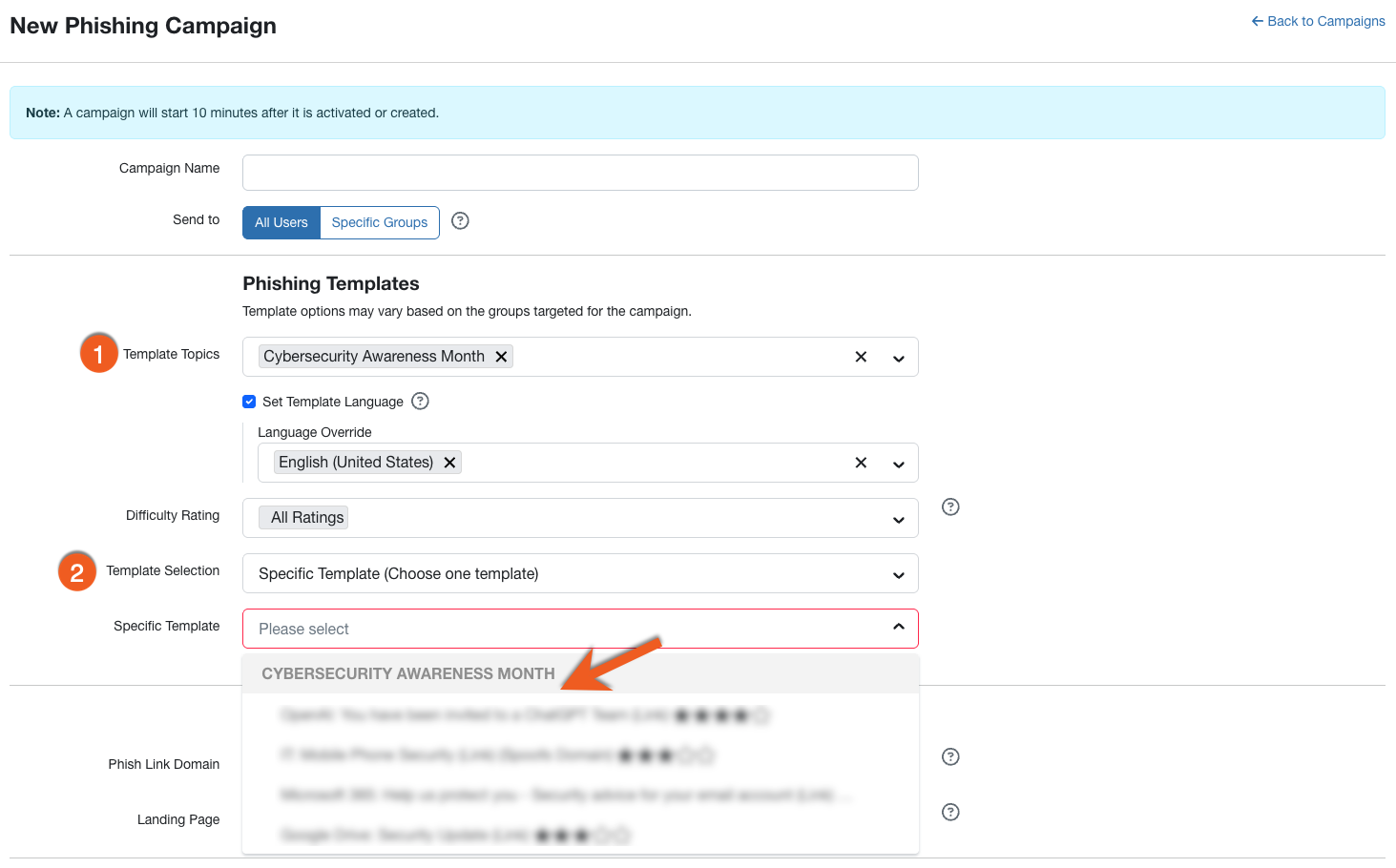
Template Topics: Select Cybersecurity Awareness Month .
-
Template Selection: Select Specific Template (Choose one template). Then, select one of the templates listed below. The area below the arrow in the screenshot will show these four templates in a drop-down menu:
- Week 1 - Microsoft: Upgrade to the New Microsoft Office (Link)
- Week 2 - OpenAI: You have been invited to a ChatGPT Team (Link)
- Week 3 - IT: New Password Request (Link) (Spoofs Domain)
-
Week 4 - Incident Today (Link) (Spoofs Domain)
-
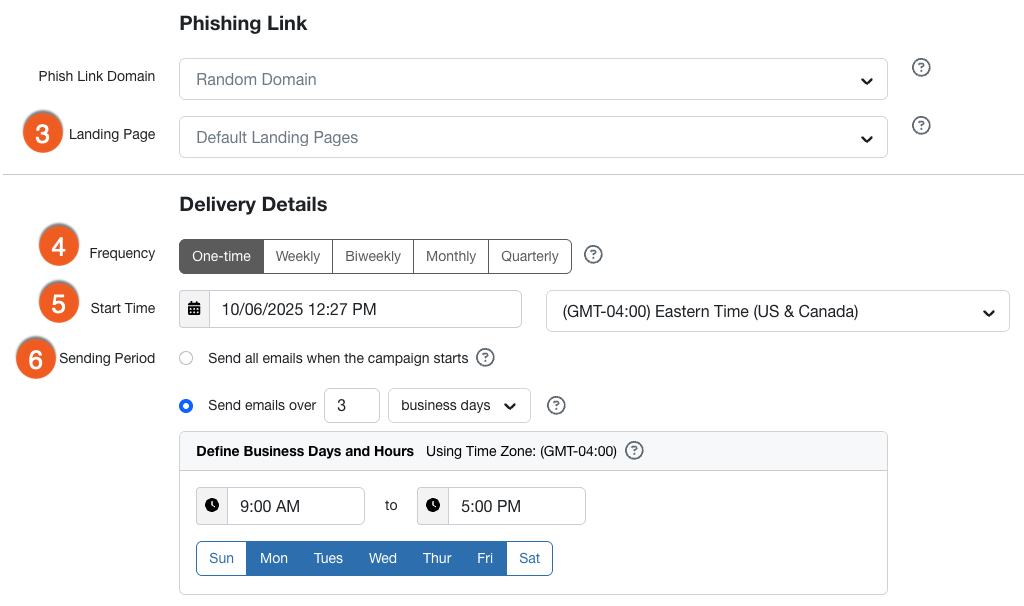
Landing Page: From the drop-down menu, select the landing page you would like to use:
- Weeks 1 and 2: Browser Language Detecting: Workforce Risk Division Escape Room
- Weeks 3 and 4: Browser Language Detecting: Workforce Risk Division Case Files
- Frequency: Select One-time.
-
Start Time: To send one phishing security test each week during Cybersecurity Awareness Month, use the corresponding dates listed below:
- For your week 1 campaign, select October 5, 2026.
- For your week 2 campaign, select October 12, 2026.
- For your week 3 campaign, select October 19, 2026.
- For your week 4 campaign, select October 26, 2026.
- Sending Period: Set your campaign to send emails over 3 business days.
- Customize the rest of the settings as you would like, then select Create Campaign.
- Repeat these steps for each of the four weeks of Cybersecurity Awareness Month