Business Email Compromise or CEO Fraud is when an attacker gains access to a corporate email account and spoofs the owner's identity to defraud the organization or its employees, customers, or partners of money.
You can use your KnowBe4 platform to simulate CEO fraud or Business Email Compromise. We also provide the options of tracking and keeping the data from replies with our reply-to feature to see how vulnerable your users are.
Note:These templates are meant to track replies only and do not contain links or attachments.
We recommend using the following settings when creating a CEO fraud template:
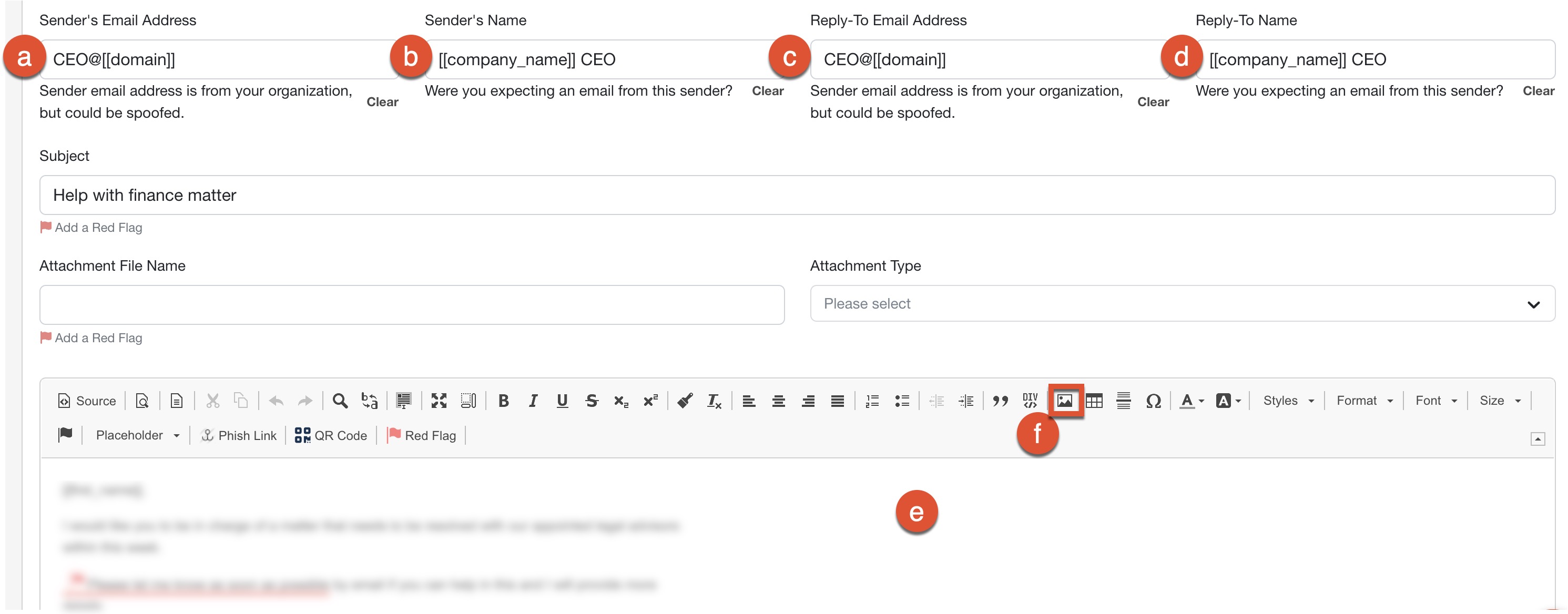
- Sender's Email Address: Use the email address of your CEO or another high-level executive to target high-risk executive groups, such as accounting or HR.
- Sender's Name: Assigning a Sender’s Name to appear on a phishing email is optional, but we recommend using this field to create a more authentic template.
- Reply-To Email Address: You can assign any different email addresses from the one used in the Sender's Email Address field that you would like your users to reply to when they select the Reply button on a phishing template.
- Reply-To Name: If you specify a Reply-To name in your phishing template, the console will use that information to populate the first portion of the sender's email address.
- Body: You can use the What You See is What You Get (WYSIWYG) editor to edit the body of your phishing email. If you would like to use HTML, select the Source button in the left corner of the WYSIWYG to edit the source code.
- Image: The Image button in the WYSIWYG lets you add any hosted images.
There are premade examples of business email compromise and CEO fraud templates in the console, found under the Reply-To Only topic or by typing in CEO Fraud in the search bar of the Phishing Templates subtab in your KSAT console.