In your KSAT console, you can enable the password-less logins feature in your Account Settings to allow users to log in to their assigned training directly without requiring them to use a password. You can also use our specially designed training notifications to let your users access training through this password-less method.
If you need further assistance with password-less logins, contact our support team.
What Are Password-Less Logins?
By default, your users will be prompted to set a password for their training account once they confirm their account and log in for the first time. Alternatively, you can set a password for your users once they are imported into the console.
If password-less logins are enabled instead, users will receive an email with a customized link. Users can click this link to access their Learner Experience (LX) or take their training directly. They can use this link to log in without creating or entering a password at any time.
This link provides users the convenience of not having to remember a password for their training account.
For board members or other employees who need to take training but cannot receive the password-less login links, you can send them to https://training.knowbe4.com/users/login/ to log in with their assigned email address and password that you set for them. Alternatively, you can manually generate a link for them by following the steps in the Generating New Password-Less Login Links section of this article. For more information about training users outside your organization's domain, see our Train External Users article.
Set Up Password-Less Logins
To set up password-less logins, follow the steps below:
- Log in to your KSAT console and click your email address in the top-right corner. Then, click Account Settings.
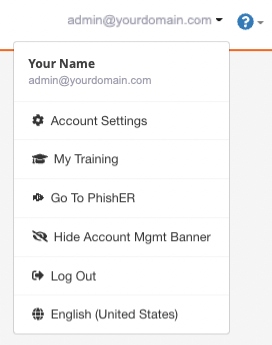
- Navigate to User Management > Users Settings section.
- Select the Use Password-less Login check box. For more information about this setting, see the screenshot and list below.
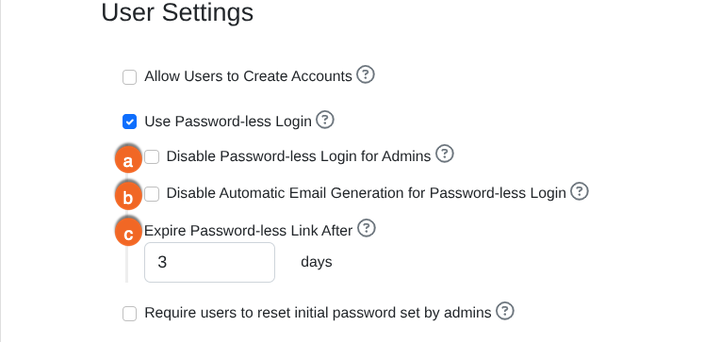 Important: We recommend that you don't select the Require users to reset initial password set by admins check box.
-
Disable Password-less Login for Admins: When selected, the password-less login option will be disabled for admins.
Note:You cannot set password-less logins for specific users or groups, with the exception of admin users. When password-less login is enabled, all users will be required to log in with a password-less login link.
- Disable Automatic Email Generation for Password-less Logins: When selected, users must click the Next button on the login page to receive a new password-less login link.
-
Expire Password-less Link After: Select how long you would like password-less links to remain active. The default is 3 days, and the maximum entry is 999 days.
Note:If your users need a new password-less login link, they can request a new link or you can send them a new link manually. For more information, see the Generating New Password-less Login Links subsection below.
-
Disable Password-less Login for Admins: When selected, the password-less login option will be disabled for admins.
- Scroll down and click Save Changes at the bottom of the page.
Generate New Password-Less Login Links
If your users' links expire, they can request new links at any time from https://training.knowbe4.com or https://eu.knowbe4.com, depending on your KSAT instance. You can also manually generate a link for a user manually from their individual User Information subtab. To generate a link for a user, follow the steps below:
- In your KSAT console, navigate to the Users tab.
- Click on the desired user.
- Navigate to the User Information subtab.
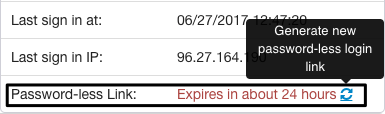
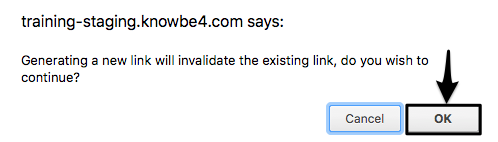
- In the Users Account Details section, click the refresh icon to the right of the expiration date. Generating a new link will automatically invalidate the previous link provided to the user.
- Click OK.
- Copy the link from the text box that displays.
- Send the link to the user so they can log in for training. Remember, the link won't be emailed to the user when you generate it for them. You'll need to provide it to them manually.

Best Practices for Password-Less Logins
For the safest login experience, we recommend using multi-factor authentication (MFA) as an extra layer of protection for your organization when using password-less logins.
In certain scenarios, you can also use SAML single sign-on (SSO) with password-less logins. If both SSO and password-less logins are enabled, users with access to KnowBe4 through SSO will log in through their SSO portal and authenticate with their identity provider. Users who don't have SSO accounts will have to wait for their password-less login notification to log in.
As a final best practice after enabling password-less logins, you should be especially aware of what training notifications you're using. We offer built-in templates with the password-less tag containing the password-less login placeholder, which will automatically populate your training notification. Alternatively, you can create your own templates that include our password-less placeholders. For more information about placeholders read the Placeholders Guide.