KnowBe4’s integration with Adlumin combines KSAT phishing and training data with Adlumin's Proactive Defense Program. The Proactive Defense Program monitors your users’ phishing and training results to identify high-risk users and maintain compliance.
Before You Connect Adlumin to Your KSAT Console
Before integrating Adlumin into your KSAT console, you must find your API address and create a Reporting Event API key. Follow the steps below to do both actions.
- Your API address depends on where your KnowBe4 account is located. Please see the table below to find the API address for your region.
Region
Base URL US https://us.api.knowbe4.com
CA https://ca.api.knowbe4.com
EU https://eu.api.knowbe4.com
UK https://uk.api.knowbe4.com
DE https://de.api.knowbe4.com
- Log in to your KSAT console as an admin.
- Navigate to Account Settings in the top-right corner under your account’s email address.
- In Account Settings, navigate to Account Integrations.
- Under Account Integrations, navigate to API > Reporting API.

- On the Reporting API tab, click the + Create New API Token button to open the API token creation screen.

- Enter a name for the token, then click Create Token.
- Please save this API token for the below steps.
Connecting Adlumin to Your KSAT Console
To set up this integration, you will need to connect your KSAT console to your Adlumin Command Console by following the steps below:
- Log in to your Adlumin Command Console admin account.
- From the Services tab at the top of the page, click Proactive Defense Program.
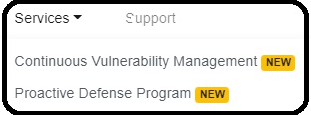
- Return to your Adlumin Command Console and click Support at the top of the page.
- Send a request to Adlumin Support to finish setting up your KnowBe4 integration. Make sure to have your Reporting API Token and API address from the above steps, which Adlumin Support will need to establish the connection.
Once the connection is established, your Proactive Defense Program dashboards and reports will begin to populate with phishing campaign and Risk Score data from your users’ KSAT accounts.
For more information about the Adlumin integration, please contact Adlumin Support.