The Defend API helps admins retrieve event data efficiently while keeping access to sensitive information secure and authenticated. The API returns details from the Recent Emails page on the Defend dashboard, allowing you to integrate that data into your Security Information and Event Management (SIEM) platform.
This guide covers the API, key management, data retrieval, and pagination.
API Features
The Defend API gives you programmatic access to threat event data, so you can pull it directly into your SIEM for centralized monitoring and analysis. The sections below cover the available regional endpoints, rate limits, and the types of event data you can retrieve.
Endpoints
When configuring a connection to your SIEM, the following endpoints are available for your region, listed in the table below:
| Region | Endpoint |
|---|---|
| US | api.us1.defend.egress.com/V1 |
| UK | london.api.aquilaiajax.com/V1 |
| EU | api.eu1.defend.egress.com/V1 |
| AU | api.au1.defend.egress.com/V1 |
Rate Limit
The Defend API allows 200 calls per hour per IP address.
Retrieval Frequency
It is recommended to call the API every 10 minutes to keep your SIEM data up to date.
Retrieval Data
The following event type data can be retrieved using the Defend API:
- Details of suspicious or dangerous emails your organization received.
- Details of how your end users responded to an email, such as replying or forwarding.
- Details of when your end users clicked suspicious or dangerous links.
- Details of emails your end users reported as phishing.
API Key Management
API keys are essential for authenticating and authorizing access to the Defend API. Careful management of these keys is crucial to ensure that users interact with the API and retrieve data securely.
Key Ownership
- A global admin of the Defend admin console should own the API key. The key inherits the same privileges as its owner.
- To obtain an API key, please contact the KnowBe4 support team.
Authentication
To authenticate your API call, set the X-API-KEY header to the value of your API key. The Defend API relies on API key authentication and does not support OAuth tokens.
Events
The Defend API exposes the four /events endpoints listed in the following table:
| Endpoint | Description |
|---|---|
| GET /events/inbound | Returns data for suspicious and dangerous inbound emails. |
| GET /events/linkClick | Returns data for suspicious and dangerous links that your end users clicked. |
| GET /events/response | Returns data for how your end users responded to an inbound email, for example, replying or forwarding. |
| GET /events | Returns data for all events above, plus the data returned by GET/report/phish. For more information, see the Reports section below. |
Query Parameters
Each event has the following query parameters that can be defined as required by your organization:
-
domain
- This should be your organization's primary domain, such as knowbe4.com.
-
startTime and endTime
- These parameters should be in the UTC time standard and formatted as follows: startTime=2024-04-17T00:00:00, endTime=2024-04-18T00:00:00.
-
excludedEvents (Optional)
- Only applies to GET/events.
- minThreat (Optional)
- pageSize (Optional)
- pageNumber (Optional)
excludedEvents
You can use the excludedEvents parameter with GET/events to customize the data you retrieve to meet your organization's needs. Combine any of the following values, separated by a comma, to exclude the data you don't need:
- EmailReceived
- EmailResponse
- EmailLinkClicked
- PhishReported
minThreat
You can use the minThreat parameter with GET/events/inbound, GET/events/linkClick, GET /events/response, and GET/events to retrieve data for a specific threat level. The values available for minThreat are listed below:
- Suspicious
- Dangerous
Return Type
This endpoint returns an EventResponse object that contains the matching events, along with pagination details such as the total result count and the page number.
Produces
This endpoint returns data as application/json, based on the value of your Accept request header. Defend conveys the media type in the Content-Type response header.
Responses
The following table lists the possible HTTP status codes, causes, and response models for this endpoint:
| HTTP Status Code | Cause | Response Model |
|---|---|---|
| 200 OK EventResponse | – | EventResponse |
| 400 Invalid Input Error | Invalid request. Verify your query parameters. | Error |
| 500 Server Error | – | Error |
Reports
The Defend API exposes the GET/report/phish endpoint, which retrieves emails your users reported as phishing.
Query Parameters
You can define the following query parameters based on your organization's needs:
-
domain
- Your organization's primary domain, such as knowbe4.com.
-
startTime and endTime
- Use UTC and format these as startTime=2024-04-17T00:00:00, endTime=2024-04-18T00:00:00.
- pageSize (Optional)
- pageNumber (Optional)
Return Type
This endpoint returns an Inline_response_200 object that contains the matching phishing reports, along with pagination details such as the total result count and the page number.
Produces
This endpoint returns data as application/json, based on the value of your Accept request header. The response's Content-Type header confirms the media type returned.
Responses
The following table lists the possible HTTP status codes, causes, and response models for this endpoint:
| HTTP Status Code | Cause | Response Model |
|---|---|---|
| 200 OK EventResponse | – | Inline_response_200 |
| 400 Invalid Input Error | Invalid request. Verify your query parameters. | Error |
| 500 Server Error | – | Error |
Pagination
You can paginate Defend API results using one of the following modes:
-
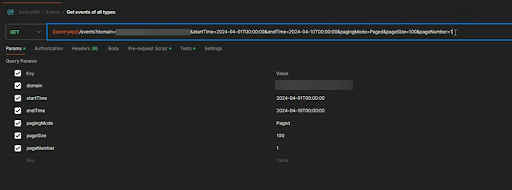
pagingMode=Paged (Default)
- Produces 100 items per page. This value can be adjusted.
- You must specify both the pageSize and pageNumber parameters to avoid an error.
-
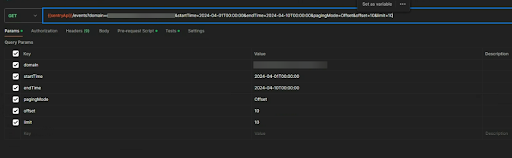
pagingMode=Offset
- You must specify both the offset and limit parameters to avoid an error.
Example 1
If you set pagingMode=Paged along with the pageSize and pageNumber parameters, the API returns 100 results per page in ascending date-time order, starting at page one.
Example 2
If you set pagingMode=Offset and include the offset and limit parameters, the API produces 10 results per page in ascending date-time order. For example, an offset of 10 and a limit of 10 return the 11th through the 21st entries, since the offset is zero-indexed.
Models
The following models describe how the Defend API exposes data for you to ingest into your platform:
| Field | Required? | Type | Format | Notes |
|---|---|---|---|---|
| to | Optional | array[EmailAddress] | – | – |
| from | Optional | array[EmailAddress] | – | – |
| rcptTo | Optional | array[String] | – | |
| mailFrom | Optional | String (email format) | – | |
| threat | Optional | Threat | – | – |
| receivedAt | Optional | Date | date-time | The date and time of the address it was received. |
| fromAddressDomainCreatedDate | Optional | Date | date-time | The date and time from the address were created. Not available once 40 days have passed since the email was first received. |
| subject | Optional | String | – | Not available once 40 days have passed since the email was first received. |
| linksClicked | Optional | BigDecimal | – | Not available once 40 days have passed since the email was first received, or if you don't use the URL scanner. |
| trust | Optional | String (enum) | – | Enum: firstTimeSender, low, medium, high |
| auth | Optional | Email_auth | – | – |
| primaryDomain | Optional | String | hostname | – |
| messageID | Optional | String | – | |
| firstTimeSender | Optional | Boolean | – | – |
| links | Optional | array[Email_links] | – | Not available once 40 days have passed since the email was first received, or if you don't use the URL scanner. |
| attachments | Optional | array[Email_attachments] | – | Not available once 40 days have passed since the email was first received, or if you don't use the URL scanner. |
| senderIP | Optional | String | IP | – |
| msSCL | Optional | BigDecimal | int32 | Microsoft Spam Confidence Level, -1 to 10 |
| replyTo | Optional | String | Value of the reply-to header, if set. Not available once 40 days have passed since the email was first received. | |
| phishType | Optional | array[String] | – | Only available for Dangerous emails where Defend is confident in the phishing type. Not available once 40 days have passed since the email was first received. |
| payloadType | Optional | String (enum) | – | Only available for Dangerous emails where Defend is confident in the payload type. Not available once 40 days have passed since the email was first received. Enum: socialEngineering, attachment, links, finance |
EmailAddress
| Field | Required? | Type | Format | Notes |
|---|---|---|---|---|
| domain | Optional | String | hostname | – |
| localPart | Optional | String | – | – |
| displayName | Optional | String | – | – |
Email_attachments
| Field | Required? | Type | Format | Notes |
|---|---|---|---|---|
| name | Optional | String | – | – |
| size | Optional | BigDecimal | int64 | Size in bytes |
Email_auth
| Field | Required? | Type | Format | Notes |
|---|---|---|---|---|
| rawAuth | Optional | String | – | Not available once 40 days have passed since the email was first received, or if you don't use the URL scanner. |
| spf | Optional | AuthResult | – | – |
| dkim | Optional | AuthResult | – | – |
| dmarc | Optional | AuthResult | – | – |
Email_links
| Field | Required? | Type | Format | Notes |
|---|---|---|---|---|
| domain | Optional | String | hostname | – |
| occurrences | Optional | BigDecimal | int32 | – |
| inAttachment | Optional | Boolean | – | – |
| clicks | Optional | BigDecimal | int32 | – |
Error
| Field | Required? | Type | Format | Notes |
|---|---|---|---|---|
| message | Optional | String | – | – |
EventResponse
| Field | Required? | Type | Format | Notes |
|---|---|---|---|---|
| count | Optional | BigDecimal | int32 | – |
| page | Optional | BigDecimal | int32 | – |
| pageCount | Optional | BigDecimal | int32 | – |
| items | Optional | array[EventResponse_items] | – | – |
EventResponse_items
| Field | Required? | Type | Format | Notes |
|---|---|---|---|---|
| event | Optional | Event | – | – |
| time | Optional | Date | date-time | – |
| linkClicked | Optional | String | hostname | Only set if the event is a link click |
| Optional | – | – |
Inline_response_200
| Field | Required? | Type | Format | Notes |
|---|---|---|---|---|
| count | Optional | BigDecimal | int32 | – |
| page | Optional | BigDecimal | int32 | – |
| pageCount | Optional | BigDecimal | int32 | – |
| items | Optional | array[Inline_response_200_items] | – | – |
Inline_response_200_items
| Field | Required? | Type | Format | Notes |
|---|---|---|---|---|
| event | Optional | Event | – | – |
| time | Optional | Date | date-time | – |
| comment | Optional | String | – | – |
| Optional | – | – |