KnowBe4 Labs gives you an early, firsthand look at new and experimental features before they're released to the rest of our customers.
How It Works
When you opt in to KnowBe4 Labs, you will get early access to upcoming features and can try our newest innovations before anyone else. Your feedback helps shape the future of KnowBe4.
The KnowBe4 Labs icon, a badge with a flask, identifies any feature included in KnowBe4 Labs.
How to Opt In and Opt Out
When a new feature is available in KnowBe4 Labs, a pop-up window will open, allowing you to opt in to the feature. Opting in automatically enables KnowBe4 Labs on your account.
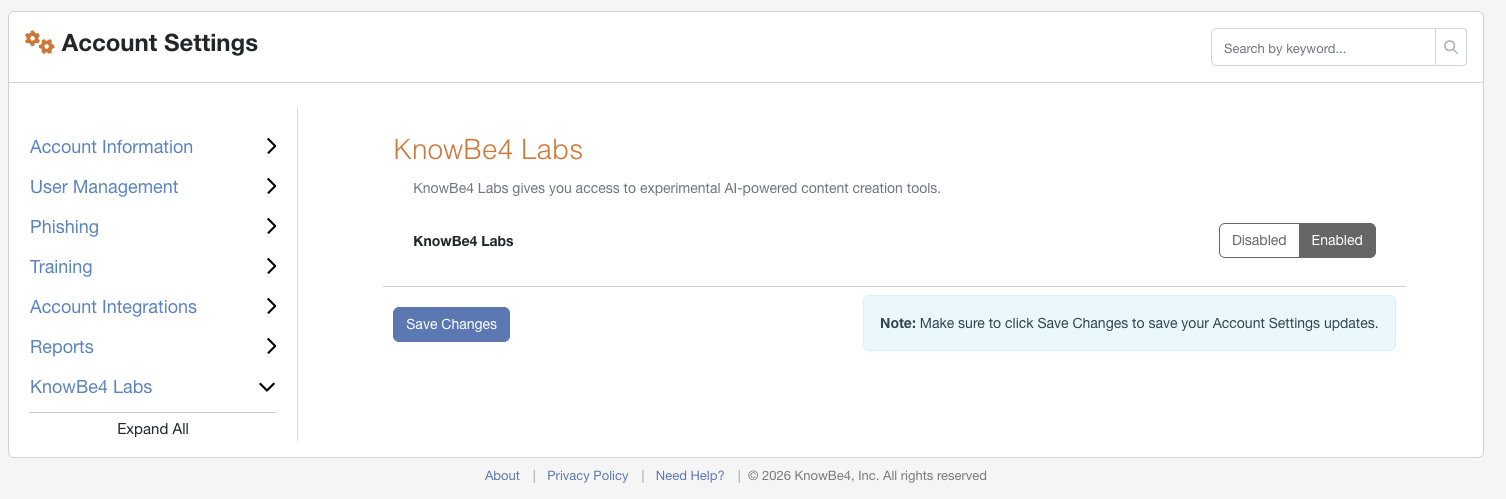
You can also opt in through Account Settings by navigating to Account Settings > KnowBe4 Labs > Enabled > Save Changes.
To opt out of KnowBe4 Labs, navigate to Account Settings > KnowBe4 Labs. If KnowBe4 Labs is enabled, you can select the Disabled button to opt out of its tools, then select Save Changes.
Why We’re Doing This
Some of the features in KnowBe4 Labs are still in development. That's intentional. We want your feedback while there's still time to shape the final product, not after it's already released. Your input helps us build features that work the way you actually need them to.