Defend will integrate with your organization's email system to process and analyze emails. Defend requires Microsoft App Registrations to analyze emails in users’ inboxes.
See the diagram and steps below for how an email is handled alongside Defend.
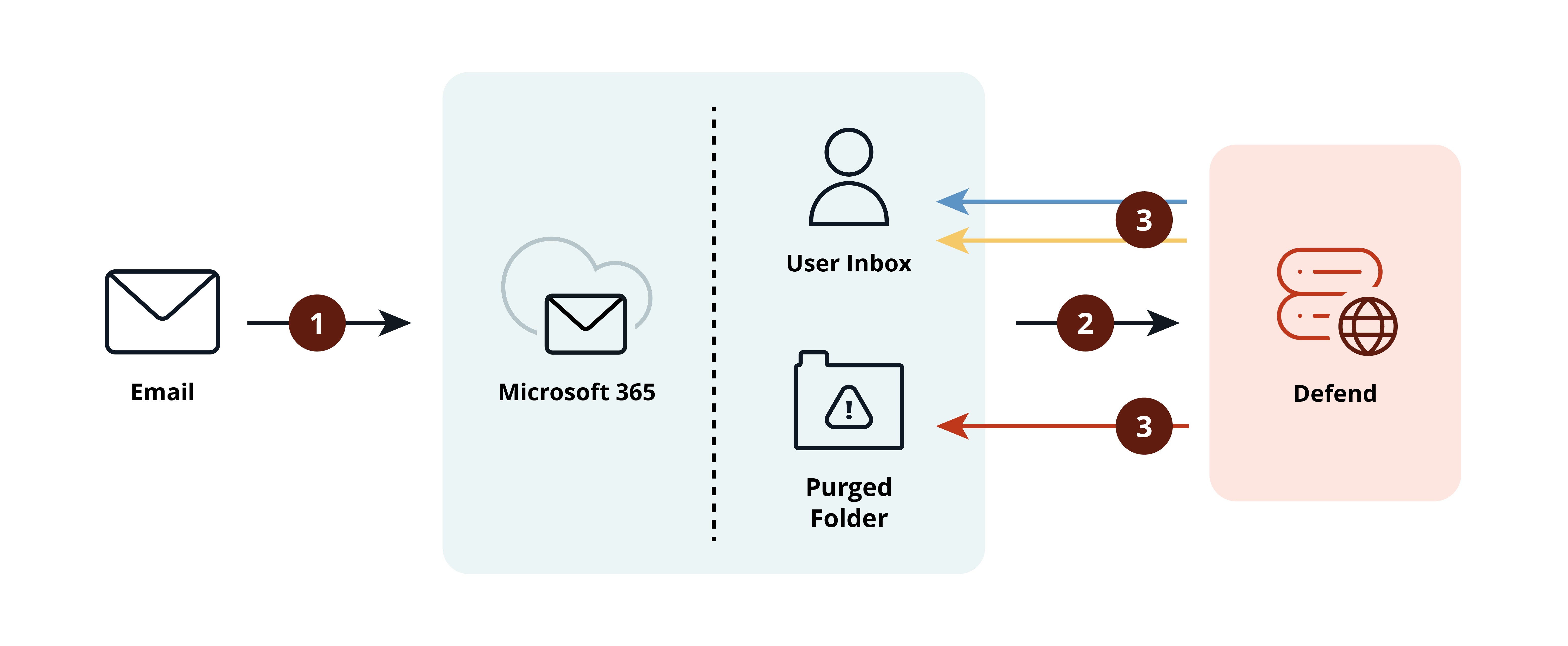
- An email arrives in a Microsoft 365 user’s inbox.
- Defend analyzes the email.
- Depending on the outcome of the analysis, Defend can do the following:
- The email is benign and marked with the appropriate blue tags in the user’s inbox.
- The email is suspicious and marked with the appropriate yellow tags. The email will be actioned according to the admin-configured settings. By default, the suspicious email remains in the user’s inbox with the suspicious tag applied. Defend can send a threat notification email to replace the suspicious email and educate the user about what Defend found suspicious.
- If Defend finds the email to be dangerous, it will be marked with a red tag. The email will be actioned according to the admin-configured settings. By default, the dangerous email will be moved to the Purged folder. Defend can send a threat notification email to replace the dangerous email and educate the user about what Defend found dangerous.