Defend is an email security tool that evaluates the context, relationships, and message content of your inbound emails. This analysis occurs when emails reach your inbox, helping prevent inbound cyber threats and allowing your admins to identify and act on any future breaches.
Tags
Based on Defend’s analysis, incoming emails from outside of your organization will have a colored tag applied to them. These colorful tags indicate how the email has been classified. The tag color corresponds to its associated threat level.
These tags let you quickly identify an email's Defend classification before you even open it. Tags can also be selected to view all emails categorized under that tag.
The following color and category tags may be added to your emails, along with an example of each:
| Tag | Color | Description |
|---|---|---|
| Graymail | Gray | Non-malicious bulk email, such as a promotional or rewards newsletter, that you may have opted into in the past. |
| Spam | Gray | Unsolicited bulk email that may contain malicious links or attachments. |
| First-time sender | Blue | Flags a message from a sender who hasn't emailed you before. |
| Financial | Blue | Flags a message that references billing, payments, or financial account details. |
| Sensitive | Blue | Flags a message that references account security or other sensitive account activity. |
| Threat Notification | Blue | Indicates Defend has replaced a suspicious or dangerous email with a threat notification. See the Threat Notification section below. |
| Suspicious | Amber | Flags a message with characteristics commonly associated with phishing, such as urgency or a mismatched sender domain. |
| Impersonation | Amber | Flags a message where the sender appears to be posing as a known contact or organization. |
| Dangerous | Red | Flags a message Defend has identified as a high-confidence threat.* |
*You may never see a Dangerous tag if your admin configured the settings to send dangerous emails to quarantine or replace them with a threat notification.
Category Labels in Microsoft Outlook
Defend applies category tags directly as Microsoft Outlook categories, so how a tag looks depends on which version of Microsoft Outlook you're using.
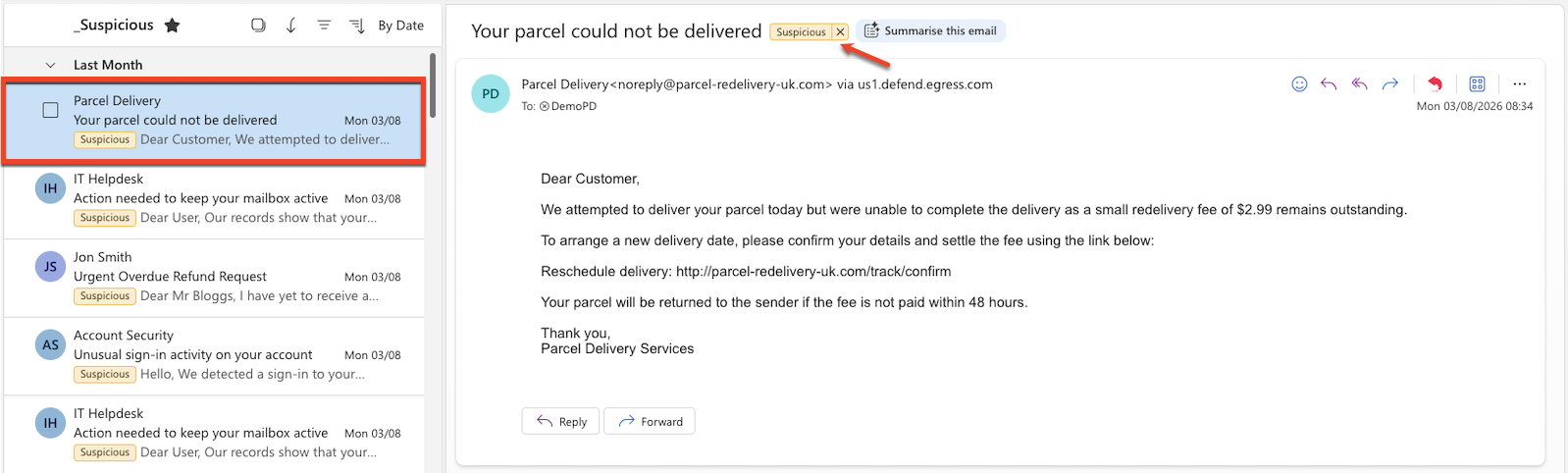
New Outlook
The category appears as a colored pill with the label text (here, Suspicious) and an X to remove it. It's visible in both the message list (below the sender and subject) and the reading pane (next to the subject line). This feature is considerably more prominent than the Classic Outlook rendering described next.
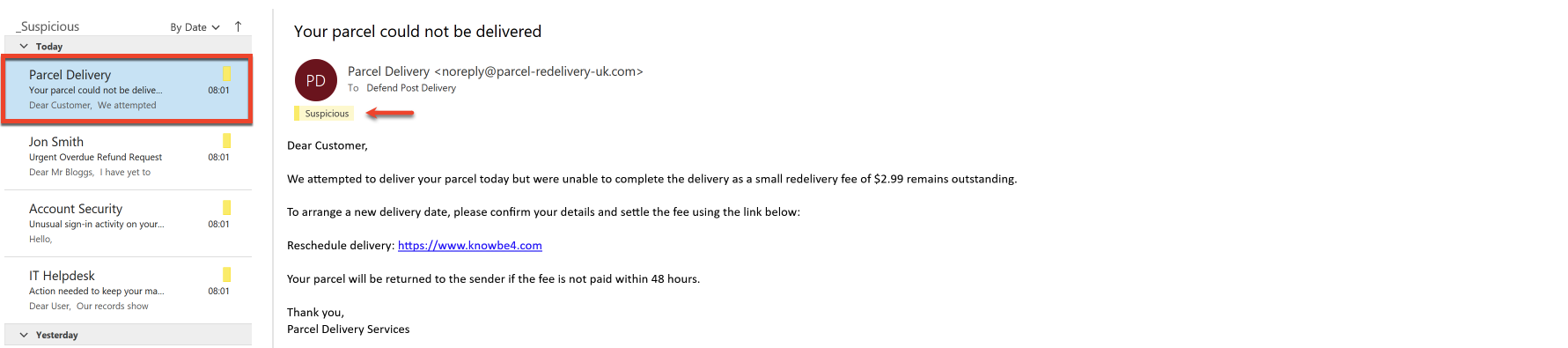
Classic Outlook
The category appears as a thin colored bar with the label name shown inline in the message header, above the message body. In the message list, only the colored strip is visible. There's no label text, so it's easy to miss.
Threat Notification
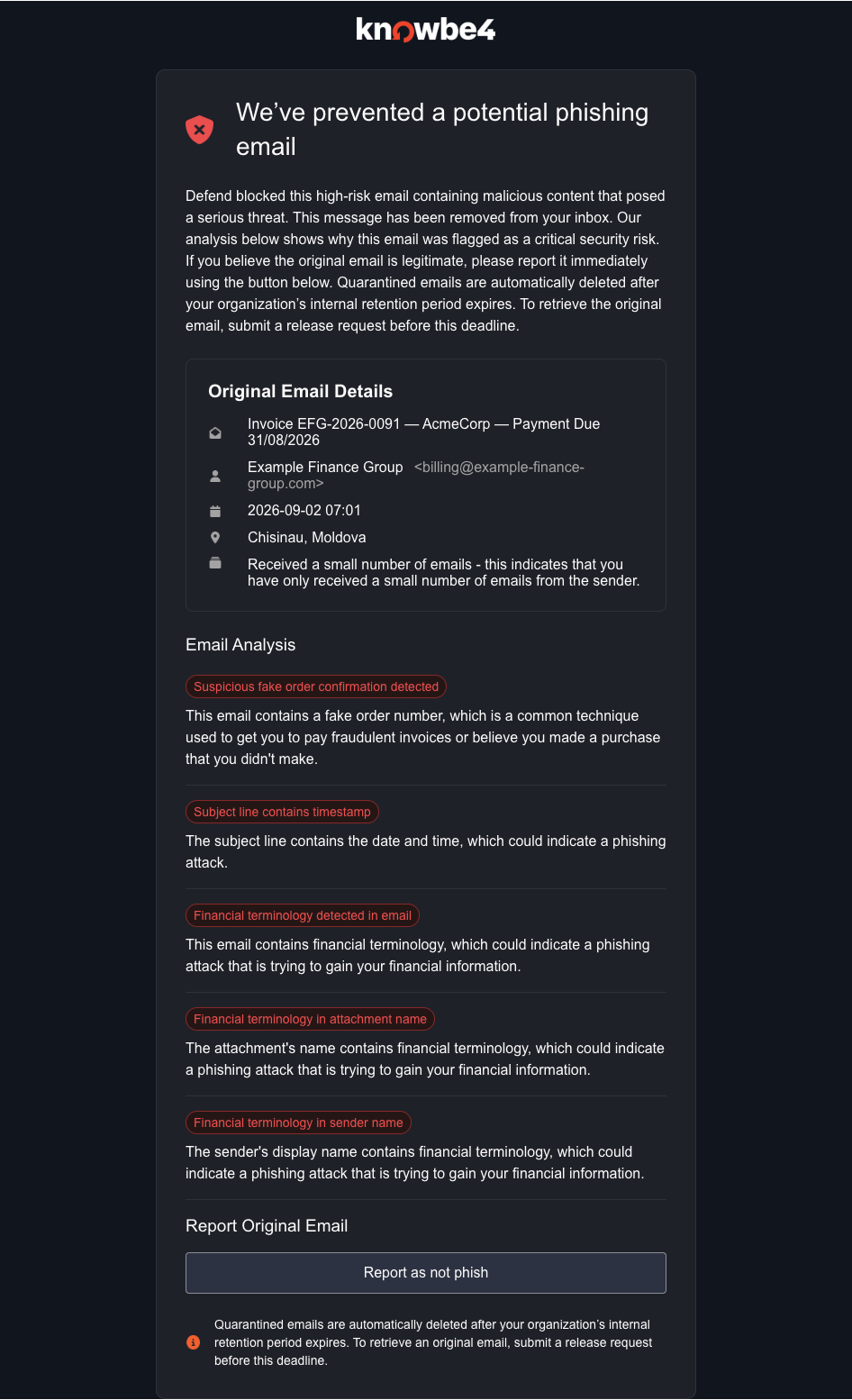
If configured by your admin, Defend may send you threat notification emails to help you recognize phishing attempts. These emails arrive after Defend identifies an email as suspicious or dangerous and will be marked with a blue tag in your inbox. Threat notifications replace the original suspicious or dangerous email with information about what Defend detected.
Threat notification emails contain the following information and options:
- Original email details
- Subject
- From address
- Sent time
- Sender location
- Sender relationship history
- Email Analysis Summary
- Provides details for up to five reasons why Defend thought the email could be a phishing attack.
- Report buttons
- Report the original email as “Phish”. This option is only available for emails identified as suspicious.
- Report the original email as “Not Phish”.
An example threat notification email is shown in the screenshot below.
Productivity Management
Managing your inbox effectively requires distinguishing between different types of bulk communication. Defend categorizes unsolicited or non-essential emails into two main groups:
- Graymail
- Non-malicious bulk email, such as newsletters or marketing updates, that you may have opted into in the past. It is technically wanted at some point, but it can become distracting.
- Spam
- Unsolicited and potentially dangerous bulk email. These are often sent for commercial purposes and may contain malicious links or attachments.
Depending on your organization's configuration, emails flagged as graymail or spam will either:
- Appear in your inbox with a Graymail or Spam tag.
- Be sent to your Graymail or Junk folder with a Graymail or Spam tag.