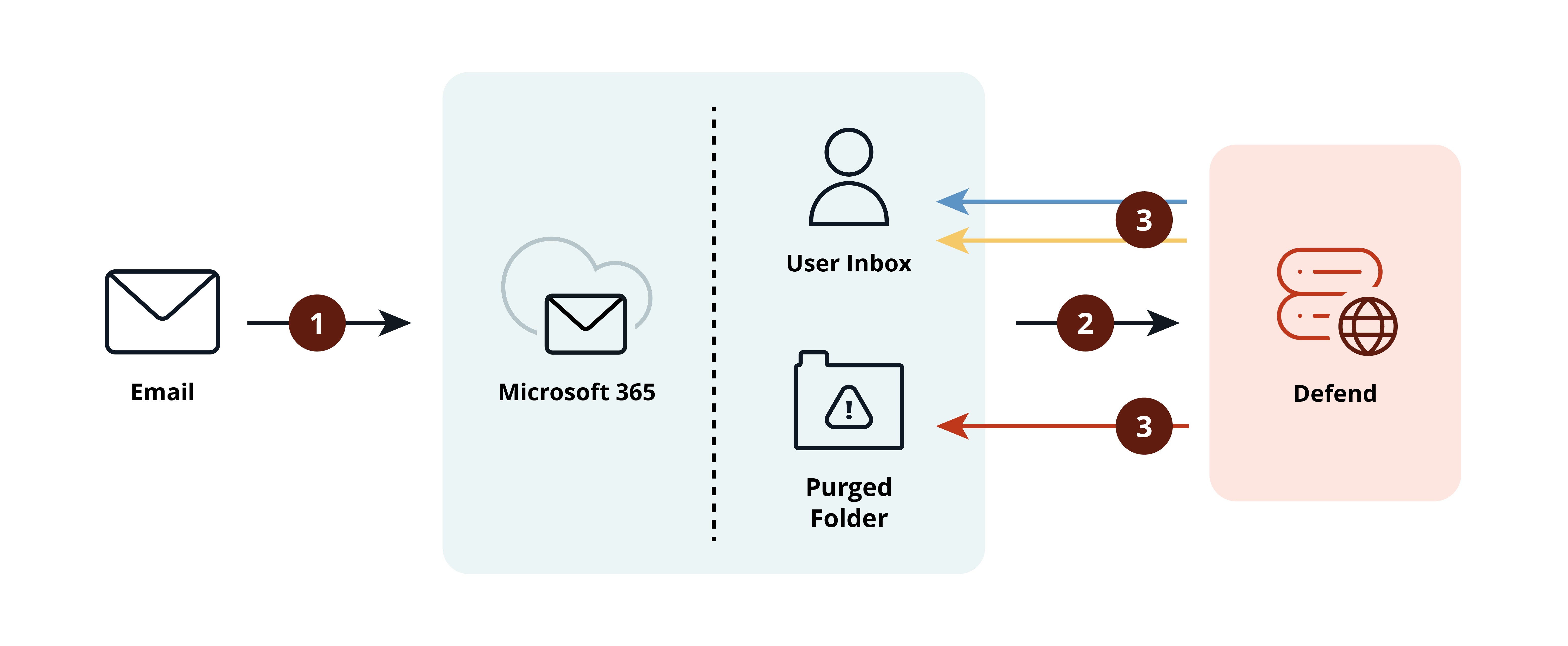
Defend post-delivery leverages the Microsoft Graph API to provide a secondary layer of security by analyzing emails directly within a user's inbox. Once an email is delivered, our system continuously monitors for emerging threats. If an issue is identified, Defend can either tag emails with helpful categories like graymail or spam or, in the case of high-risk threats, replace the malicious content entirely with a threat notification. This notification provides clear context on the risks found, while allowing users to report false positives.
This article provides an overview of the deployment process and technical specifications required to implement and operate Defend successfully.
Feature Analysis
When Defend detects threats, protective measures can be applied, such as tags, threat notifications, auto-remediation, email productivity, and abuse mailbox notification functionality. Admins can use the Defend admin console to configure Defend’s settings to suit an organization’s needs.
For full details about Defend's post-delivery features, see the Defend | Post-Delivery Defend Feature Analysis article.
Deployment
The Defend deployment center is a comprehensive wizard that allows admins to configure and deploy Defend features to their organization easily. Admins are guided through each section of the deployment process, and progress is saved at every step. Once the deployment center is complete, admins gain access to the Defend console, where further customization can be completed.
For full details about the deployment process, see the Defend | Post Delivery Quickstart Guide.
Summarized Changes
To ensure seamless integration and full functionality with your Microsoft 365 services, Defend will deploy app registrations within your environment. During the setup process, you will be prompted to grant the specific permissions required for these registrations to interact with your Microsoft 365 tenant securely.
Architecture
Defend will integrate with your organization's email system to process and analyze emails after delivery to users.
Data Storage
Defend stores email metadata, which is used for reports and dashboards in the console.
Hosting and Availability
Defend is split across two data centers in Amazon Web Services (AWS), which makes use of availability zones. These zones are isolated locations within a region, each with its own independent power, networking, and cooling infrastructure to ensure full redundancy.
Current hosting regions are the UK, the US, the EU, and AU.
Service Outages
We have extensive monitoring and will be alerted if Defend is not operational. We will then follow our incident process to determine the issue. If the issue can be resolved easily, we will rectify this quickly.
During an outage, the redundancy measures detailed above will be used to failover. No emails will be lost in this process. However, emails will be delivered without Defend banners or link rewriting.
If you wish to disable Defend completely during an outage, you can do so by removing all users from the Defend_User_Group. In this event, Defend will not scan emails and will deliver them to users without banners. Once Defend is operational, users can be added back to the group, and normal email scanning will resume.
Latency
Defend typically processes emails in the low single digits of seconds. However, if Microsoft 365 is experiencing issues, Defend will retry to ensure that it is analyzed as soon as Microsoft 365 becomes available.
Alerting
We use AWS metrics and alarms to monitor the Defend system 24/7 on a granular level.
Defend integrates via the Microsoft Graph API, and therefore, system behavior during an outage depends on which component is affected:
- If Microsoft 365 is down:
- Incoming emails will still be delivered to and held in the user's inbox. However, Defend will be unable to access or scan these messages while the Microsoft 365 environment is unreachable. Once Microsoft 365 services are restored, Defend will automatically resume operations and scan the accumulated emails.
- If AWS regions are down:
- In the highly unlikely event of a total AWS regional outage, your email flow remains uninterrupted. Emails will continue to be delivered to your environment as usual; however, Defend will be temporarily unable to perform security analysis until the AWS infrastructure is back online.
We have a service status system that shows live service updates for all our platforms. Customers can subscribe to notifications on the status page to be notified when there is a change to any of our services.