Prevent uses machine learning and behavioral artificial intelligence to learn how users in your organization normally communicate. When something doesn’t look right, Prevent can alert users and give them a chance to correct their mistakes. This applies to situations such as mistyped email addresses or unusual file content. Admins can use the Prevent admin console to configure policies that are suitable for your organizations needs.
This article provides an overview of the deployment process and technical specifications required to successfully implement and operate Prevent.
Feature Analysis
Before getting started with Prevent or Prevent Enterprise, it is important to understand which features are available to your organization.
To learn more about which features are available with Prevent and Prevent Enterprise, see the Prevent vs Prevent Enterprise article.
Components
Prevent is made up of several components hosted in the Microsoft Azure Cloud. The components are as follows:
- API Interface
- Acts as a centralized access point for all user traffic.
- All requests from the web add-in are routed to the API.
- It enforces key security measures, such as request rate limiting and enforced SSL encryption.
- Gateway
- The gateway supports all email traffic that cannot be fully processed by the Web add-in. If Prevent detects anything suspicious, these emails will receive email nudges instead of real-time nudges.
- Authentication and Policy Service
- Provides policy retrieval to ensure users receive accurate and helpful advice when sending outbound emails.
- Facilitates secure user authentication to ensure safe and controlled access to functionality.
- Storage
- Provides logging for the Prevent platform by maintaining records of client request metadata and responses.
- Uses boundary-level protection, cryptographically signed authentication, encryption at rest, enforced SSL for all intra- and inter-datacenter traffic, and threat protection.
- KnowBe4 Email Security Add-In
- The KnowBe4 Email Security add-in (KESA) for Microsoft Outlook is a component of the KnowBe4 Prevent product designed to mitigate the risk of data breaches caused by human error. It provides real-time guidance to users as they compose emails, analyzing recipients and content to warn them of potential issues, such as misdirected emails or the accidental sharing of sensitive data, before the message is sent.
- Analytics
- Prevent Analytics is the centralized reporting dashboard within the KnowBe4 platform, providing actionable intelligence on outbound email risk and user behavior. It aggregates data from the KnowBe4 Email Security add-in, providing admins with an overview of potential data breaches prevented and how employees respond to real-time nudges.
Deployment
The Prevent deployment center is a comprehensive wizard that allows admins to configure and deploy Prevent to their organization easily. Admins are guided through each section of the deployment process, and progress is saved at every step. Once the deployment center is complete, admins gain access to the Prevent console, where further customization and product configuration can be completed.
For full details about the deployment process, see the Prevent Quickstart Guide.
Summarized Changes
Prevent will deploy multiple elements within your Microsoft 365 environment to ensure seamless integration and proper functionality between Prevent and your Microsoft 365 services. This deployment includes the creation and configuration of the following elements:
- One accepted domain
- One app registration
- Two connectors
- Two Microsoft 365 Groups
- One email nudge mailbox
- Two transport rules
- One spoofed sender entry
During the deployment process, you will grant the necessary permissions for each of these components to operate effectively within your organization's Microsoft 365 tenant.
For full details about the changes you will see in your Microsoft 365 environment, see the Prevent Quickstart Guide’s Summarized Changes section.
Architecture
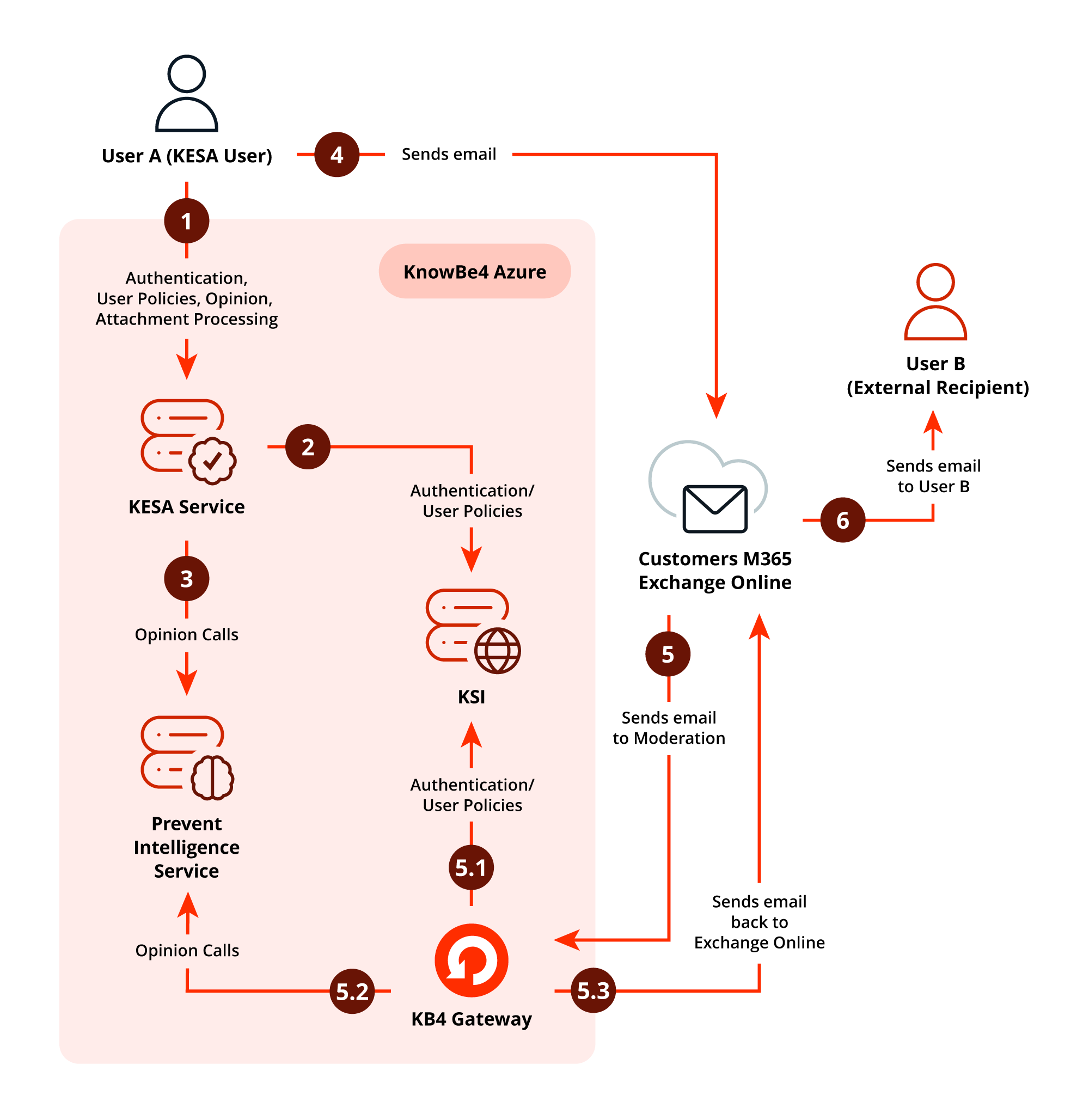
This architecture diagram above illustrates the end-to-end process of an email being composed by user A, a KnowBe4 Email Security add-in (KESA) user with the KESA add-in, and the security checks performed by the KnowBe4 Azure services before the email is either sent to user B or sent to the Prevent gateway for further analysis.
Real-time Analysis Flow
These steps occur as user A interacts with the KESA service, typically before clicking Send.
- Authentication, user policies, opinion, and attachment processing:
- User A initiates the process by composing an email. The KESA service handles authentication and processes the email body and attachments for initial policy checks and data matching.
- Authentication and user policies:
- The KESA Service communicates with the KnowBe4 Security Intelligence (KSI) service to retrieve the specific user policies and perform necessary authentication checks for user A.
- Opinion calls:
- KESA makes real-time calls to the Prevent intelligence service as the user adds and removes recipients to the email to get an opinion or determination on the email content regarding potential policy violations, such as misdirection or data exfiltration.
Gateway Analysis Flow
This covers the final action of sending the email and the path to take if analysis is required at the Prevent gateway, instead of real-time analysis.
- Sends email
- User A clicks Send. If the real-time analysis checks pass, the email is sent directly to the organization’s mail environment for processing to send to user B.
- Gateway analysis
- If a policy violation is detected, a timeout occurs, the user doesn’t have KESA, or the user is on a mobile device, the email is diverted to the Prevent gateway for analysis, including authentication, policies, and opinion calls.
Final Delivery
- Sends email to user B
- If all analysis results in clearance, the customer’s Microsoft 365 Exchange Online service releases the email for final delivery to the external recipient, user B.
Ingestion
For Prevent to provide the most value, it requires a baseline dataset and an understanding of email relationships. This data is acquired through ingestion.
Key considerations for ingestion include the following requirements and capabilities:
- Historical Data Collection: Ingests 12 months of metadata if available.
- Platform Compatibility: Only available for organizations using Microsoft Exchange Online.
- Shared Mailbox Support: Ingestion is a requirement for shared mailbox support. This feature ensures users receive real-time Prevent advice when sending from a shared mailbox or on behalf of another user.
Data Storage
Prevent stores the following data:
- Sender
- From
- Sender Display Name
- From Display Name
- Recipients – display name and email
- SentBy Address
- Mailbox Address
- Sent Date
- Parent Thread Index
- Message References
- Thread Index
- Exchange Message Class
- Message ID
- InReplyTo Message ID
- Hashed identifiers
- Subject line
- Attachment names
- Organizational secrets such as Graph access credentials*
*Additional metadata stored by the Gateway
All data is stored for 18 months. All activity between Prevent and its underlying data sources occurs over a secure connection using at least TLS 1.2.
Data Segregation
Customer data is isolated through unique organizational IDs. Authentication and database queries are performed at the organizational level, ensuring complete data separation between organizations. All communication between the Prevent application and data sources uses secure connections with TLS 1.2 or higher encryption.
Hosts and Redundancy
Prevent is hosted in Microsoft's Azure Cloud Service, distributed across multiple geographic regions including the United Kingdom, Europe, the United States, and Australia, and utilizing availability zones where available. These are isolated locations within a region, each with independent power, networking, and cooling infrastructure to ensure full redundancy. Where availability zones are not available, backup infrastructure is maintained in a separate region within the same geographic area.
A fault-tolerant orchestration layer provisions virtual machines hosting all applications. Under normal operations, these are automatically distributed across all availability zones. During a zone failure, virtual machines are automatically provisioned in the remaining zones to compensate for missing capacity.
Prevent utilizes zone-redundant storage and database-layer replication to ensure data persistence during zone failures. In the event of a full region failure, a backup and restore process is initiated.
Prevent clients are configured to connect to the most appropriate region based on their geographic location and data protection requirements, with hosting available in the UK, EU, US, and AU regions.
Latency
The KnowBe4 Email Security add-in typically processes emails within one to two seconds. In the unlikely event that the service cannot respond before the request times out, the client will react depending on the request type as follows:
- Authentication requests and configuration data requests
- If a user's access token has expired and must be refreshed while the service is not responding, the user will not be able to obtain a new access token and therefore cannot log in to the client. Policy-based configuration will be unavailable.
- If available, registry configuration will be used instead.
- Background requests
- The client will wait for one minute and retry until the request succeeds or is canceled.
- When these timeouts occur, users won't receive advice while composing their email.
- Foreground requests
- The request will timeout after a configurable period. The default timeout is three seconds.
- When these timeouts occur, the service fails open, and the email is sent without being checked by Prevent.
Alerting
The Prevent system is constantly monitored on a granular level. If systems are impacted, KnowBe4 will be notified, and the incident process will begin.
KnowBe4 has a service status page that shows live service updates for all KnowBe4 products. Customers can subscribe to status page notifications to be notified when there are any changes in our services.
If subscribing to email notifications, we recommend using an email address that is not part of your Defend or Prevent mail flow.
View our status page and subscribe here: https://status.knowbe4.com/ https://status.knowbe4.com/ (link opens in new window).
Network Configuration
Communication to KnowBe4 is via HTTPS. If SSL inspection or decryption is being used, customers may be required to add proxy exceptions to bypass this for the regional URLs listed below to avoid interference.
Global
- switch.egress.com
- gc.egress.com
United Kingdom
- uk.intelligence.egress.com
- uk.kes.knowbe4.com
Europe
- eu1.esi.egress.com
- eu.intelligence.egress.com
- eu.kes.knowbe4.com
North America
- us1.esi.egress.com
- us.intelligence.egress.com
- us.kes.knowbe4.com
Asia-Pacific
- au.esi.egress.com
- au.intelligence.egress.com
- au.kes.knowbe4.com