You can integrate your Exaforce Exaforce (link opens in new window) platform into your KSAT and PhishER consoles. Exaforce allows you to access phishing and security awareness data, retrieve reporting data, and use phishing alert intelligence and features through the Product API.
Before You Connect Exaforce to Your KSAT and PhishER Consoles
Before integrating Exaforce into your KSAT console, you must generate a Reporting API. For more information on how to create a Reporting API token, please visit the Creating a Reporting API Token section of our Reporting API Overview article. Then, you’ll need to save this token somewhere that you can easily access.
You will also need to create a Product API key to integrate Exaforce with PhishER. For more information on how to create a Product API token, please visit the Creating a Product API Token section of our Product API Overview article.
Then, you'll need to save this token somewhere you can easily access.
Connect Exaforce to Your KSAT and PhishER Consoles
You can connect your Exaforce platform to your KSAT and PhishER consoles by following the steps below.
- Log in to your Exaforce platform.
- Navigate to Platform > Data Sources and select Connect Data Source.
-
In the KnowBe4 tile, select Connect.
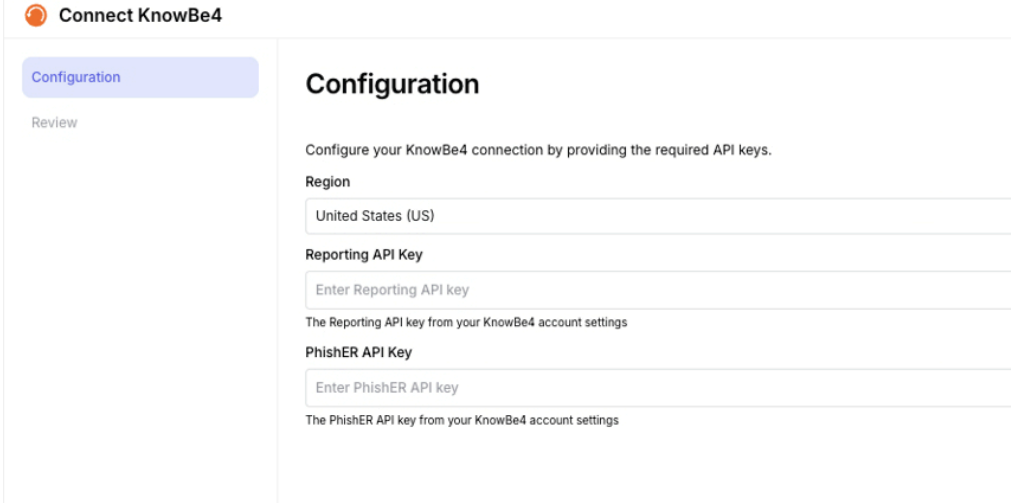
- Select your appropriate geographic region from the Region drop-down menu.
- Enter the Reporting API token from the previous steps in the Reporting API Key field.
- Enter the Product API token from the previous steps in the PhishER API Key field.
- Select Next.
- Review the connection, and select Submit to complete connecting to KnowBe4. Your data has now been onboarded into Exaforce, and phishing alert data will now be displayed in your Exaforce console dashboard.