Microsoft is implementing new tenant-level outbound email limits for Microsoft Exchange Online customers. These limits, known as the Tenant External Recipient Rate Limit (TERRL), restrict the number of external recipients a tenant can message per day. If this limit is exceeded, subsequent messages will be blocked with Non-Delivery Receipts (NDRs).
Starting April 2025, Microsoft will enforce daily limits on the number of external recipients your organization can email from Exchange Online. These limits are calculated based on your license count and apply to a 24-hour sliding window. The rollout timeline for these limits are displayed in the table below:
| Phase | Tenant Group | Rollout Start Date |
|---|---|---|
| 1 | Tenants with ≤ 25 email licenses | April 3, 2025 |
| 2 | Additional tenants with ≤ 200 licenses |
April 10, 2025 |
| 3 |
Additional tenants with ≤ 500 licenses |
April 17, 2025 |
| 4 |
All remaining tenants |
May 1, 2025 |
Understanding Your Limits
Your daily external recipient limit is calculated using the following formula:
500 × (Number of Non-trial Email Licenses^0.7) + 9500
Example limits:
- 1 license = 10,000 recipients per day
- 100 licenses = 22,059 recipients per day
- 1,000 licenses = 72,446 recipients per day
Trial tenants are limited to 5,000 external recipients daily, regardless of license count.
What Counts as an External Recipient?
Any recipient with a domain not registered as an accepted domain in your tenant counts as an external recipient. Messages sent to distribution groups are counted based on the number of external recipients in the expanded group.
What Doesn't Count as an External Recipient?
The following message types won't count against your quota:
- Journaling messages using Microsoft Exchange Online journaling rules
- Automatic replies, including Out of Office emails
- Delivery notifications, read receipts, and Non-Delivery Reports (NDRs)
- Messages sent via Azure Communication Services or Microsoft Exchange Online High-Volume Email
- Email notifications from Microsoft cloud applications such as SharePoint and Teams
Monitoring Your Usage
In the Exchange Admin Center (EAC), Microsoft will provide a new report showing your current usage and limits. You can find this by navigating to EAC > Reports > Mail flow > Tenant Outbound External Recipients Rate.
You can also use the PowerShell cmdlet Get-LimitsEnforcementStatus to retrieve your limit information.
What You Need to Do
Follow the steps below to ensure you don't exceed your daily limit:
- Review your current email-sending patterns to understand if you might exceed these new limits.
- Check your tenant's limit in the new Tenant Outbound External Recipients report in the Microsoft Exchange Admin Center.
- Consider mail flow adjustments such as:
- Removing or modifying outbound mail flow rules that route through KnowBe4 services
- Spreading high-volume email campaigns across multiple days
- Using alternative services for bulk emailing. Microsoft recommends Azure Communication Services.
- Monitor for NDR messages with codes 550 5.7.232 for trial tenants or 550 5.7.233 for non-trial tenants. These messages indicate if you have exceeded your limit.
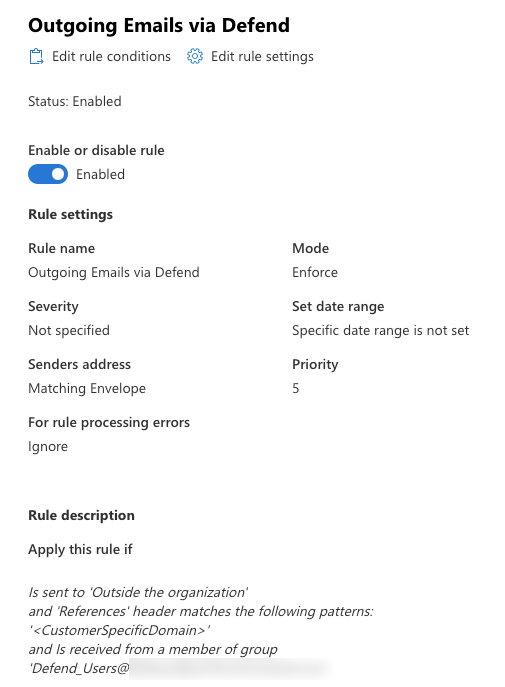
- Edit the Outgoing Emails via Egress Defend mail flow rule in Microsoft 365 to ensure emails are not counted twice. Updating the rule ensures that only emails previously processed by Defend, when sent inbound to your organization, will be processed when being replied to or forwarded outbound. An example updated mail flow rule can be seen in the screenshot below:
- Log in to your Microsoft admin center.
- Navigate to Mail flow > Rules.
- Navigate to the Internal Emails via Egress Defend rule. Copy the entry that specifies your "<CustomerSpecificDomain>" and the entry of "References header contains <CustomerSpecificDomain>".
- Navigate to the Outgoing Emails via Egress Defend rule.
- Select Edit rule conditions and add another Apply this rule if.
- Add an entry for "and 'References' header contains '<CustomerSpecificDomain>'" that you copied from the Internal Emails via Egress Defend rule.
KnowBe4 is actively researching mitigation methods to reduce our impact on your outbound email volume. We are working closely with Microsoft to understand these new limits and develop solutions to ensure our services continue working optimally with Microsoft Exchange Online.
We will update this article with additional information and recommendations as we learn more from Microsoft.