This guide explains how to deploy the web add-in for your Microsoft 365 users. This solution enhances your organization's security by providing powerful encryption services and delivering real-time guidance when sending emails. It ensures consistent protection throughout your organization, as the add-in will be deployed to all supported devices, including Outlook Web Access (OWA), Mac, and Windows.
Prerequisites
Before you get started, please ensure you have the following:
- Global admin rights to your organization's Microsoft 365 admin portal
- Microsoft Outlook JavaScript (JS) API requirement set 1.8 or later
- A gateway must be provisioned for all Web add-in deployments and requires a minimum of 25 licensed seats.
- Optional: Microsoft 365 or Azure AD group to assign Office JS to a user group
Deployment Steps
- Log in to your Microsoft 365 admin portal.
-
Navigate to Settings > Integrated apps > Add-ins.
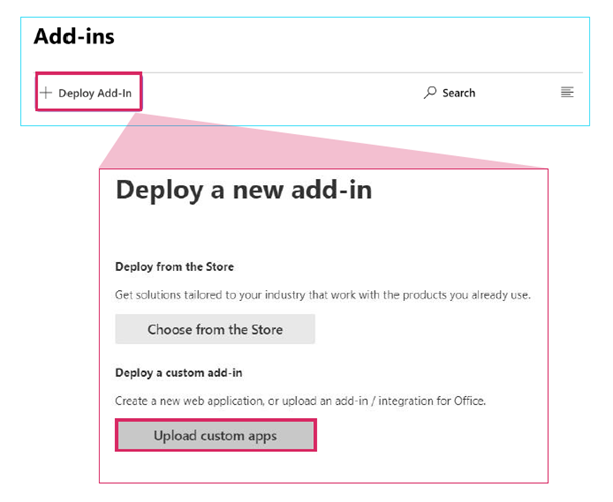
- Select I have a URL for the manifest file and paste the URL for the Microsoft add-in manifest file into the field.
- UK Manifest: https://www.knowbe4.com/hubfs/prod-uk-manifest.xml
- US Manifest: https://www.knowbe4.com/hubfs/prod-us-manifest.xml
- EU Manifest: https://www.knowbe4.com/hubfs/prod-eu-manifest.xml
- AU Manifest: https://www.knowbe4.com/hubfs/prod-au-manifest.xml
- Once you select Upload, you will need to select who you want to deploy the application to and how you want to deploy it:
- Assign Users: Select Specific users/groups and add the chosen users or groups.
- Deployment Method: Select Optional.
- Click Deploy.
- A green tick will display when the add-in is deployed. It may take up to 12 hours before the application appears for users.
Allowlisting
To allow the proper functioning of our services, ensure the following URLs are listed on your firewall or proxy:
- switch.egress.com
- gc.egress.com
Use the correct URLs for your region:
- uk.intelligence.egress.com
- uk.kes.knowbe4.com
- us.intelligence.egress.com
- us.kes.knowbe4.com
- eu.intelligence.egress.com
- eu.kes.knowbe4.com
- au.intelligence.egress.com
- au.kes.knowbe4.com