Understanding the interactions between Microsoft Exchange Online Protection (EOP), Microsoft Defender, and Defend is crucial for optimizing your organization's email security. To effectively understand how these systems interact, this article will walk you through the email filtering process.
When an email is received by an organization using EOP, Defender, and Defend, the filtering process follows a specific sequence:
-
Initial filtering by EOP and Microsoft Defender:
- The first layer of defense involves filtering by EOP and Microsoft Defender. This step includes various security checks, such as spam filtering, malware scanning, and the application of any configured Microsoft 365 transport rules.
- It's important to note that even if an email triggers a transport rule designed to route the email through a specific connector. Instead, the remaining EOP or Microsoft Defender processing steps continue. A header to the email noting which connector should be used once further processing steps have been followed.
-
Interaction with Defend:
- Once the email has passed through all EOP or Microsoft Defender processing and has not been quarantined, it is routed to Defend. At this stage, Defend performs its analysis, including advanced threat protection and data loss prevention checks.
For organizations that have enabled Microsoft Defender, particularly the Safe Attachments feature, there is a specific interaction to be aware of:
- During the initial pass through Microsoft Exchange, a transport rule called "Defend disabled ATP dynamic scanning" temporarily disables the dynamic scanning log for attachments.
- This action is necessary because the Safe Attachments feature may remove the attachment and place it in a sandbox for analysis, preventing Defend features from seeing the complete email.
- If Defend cannot analyze the full content, its detection capabilities are compromised.
- After the Defend console has completed its analysis and the email returns to Microsoft 365, dynamic scanning for the Safe attachments feature is still executed, for a second time, along with all other EOP or Microsoft Defender processing.
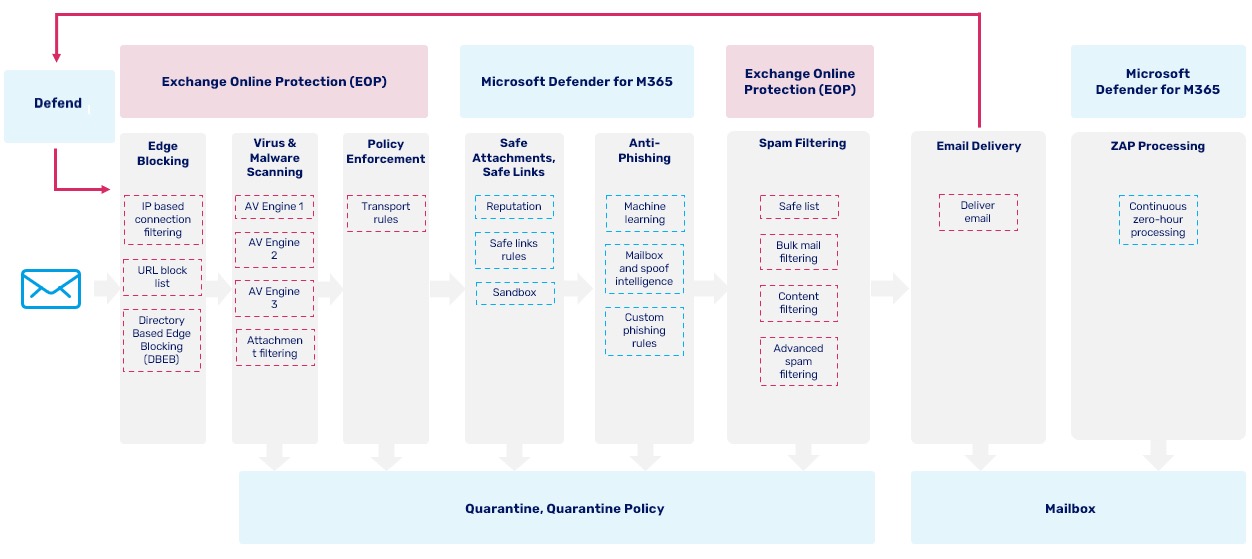
Microsoft Exchange Online Protection (EOP) and Microsoft Defender Online (MDO) with Defend
All EOP or Microsoft Defender filtering happens before an email is routed to Defend.
Transport rules are executed at the policy enforcement step. If the email triggers a transport rule that has an action to route out via a connector, Microsoft Exchange adds a header or property to the email to remember which connector should be used. It will then continue with processing the other steps. It does not send the email to Defend at this point.
Once an email has gone through all EOP or Microsoft Defender processing, if it has not been quarantined, it will be routed to Defend.
If you have Microsoft Defender enabled, specifically Safe Attachments functionality, there is a transport rule called "Defend Disable ATP Dynamic Scanning" that disables the dynamic attachment logic for all inbound emails on the first pass through Microsoft Exchange processing. This action is because the attachment can be removed and placed in a sandbox, which could result in Defend not seeing the complete email, which would hamper the detection.
When the message returns to Microsoft 365 from Defend, the dynamic scanning for safe attachments is still executed, along with all other EOP or Microsoft Defender processing for a second time.