User Management allows you to add, edit, and delete Defend admins. Different admin roles allow different view and edit rights. The different roles and their permissions can be viewed in the View Policies section under the User Management section. The permissions are as follows:
| Action | Global Administrator |
|---|---|
| Add or remove other admins | ✓ |
| Set up Azure app registrations | ✓ |
| View recent emails | ✓ |
| View and download emails | ✓ |
| View advanced email details | ✓ |
| Remediate emails | ✓ |
| View settings, notifications, and allow or deny lists | ✓ |
| Edit allow or deny lists | ✓ |
| Edit settings | ✓ |
| Edit notifications | ✓ |
| View admins and policies | ✓ |
| View audit log | ✓ |
| Action | Administrator |
|---|---|
| Add or remove other admins | |
| Set up Azure app registrations | ✓ |
| View recent emails | ✓ |
| View and download emails | ✓ |
| View advanced email details | ✓ |
| Remediate emails | ✓ |
| View settings, notifications, and allow or deny lists | ✓ |
| Edit allow or deny lists | ✓ |
| Edit settings | ✓ |
| Edit notifications | ✓ |
| View admins and policies | ✓ |
| View audit log | ✓ |
| Action | Analyst |
|---|---|
| Add or remove other admins | |
| Set up Azure app registrations | |
| View recent emails | ✓ |
| View and download emails | ✓ |
| View advanced email details | ✓ |
| Remediate emails | ✓ |
| View settings, notifications, and allow or deny lists | ✓ |
| Edit allow or deny lists | ✓ |
| Edit settings | |
| Edit notifications | ✓ |
| View admins and policies | |
| View audit log |
| Action | Auditor |
|---|---|
| Add or remove other admins | |
| Set up Azure app registrations | |
| View recent emails | ✓ |
| View and download emails | |
| View advanced email details | |
| Remediate emails | |
| View settings, notifications, and allow or deny lists | ✓ |
| Edit allow or deny lists | ✓ |
| Edit settings | |
| Edit notifications | |
| View admins and policies | ✓ |
| View audit log | ✓ |
| Action | Read Only |
|---|---|
| Add or remove other admins | |
| Set up Azure app registrations | |
| View recent emails | ✓ |
| View and download emails | |
| View advanced email details | |
| Remediate emails | |
| View settings, notifications, and allow or deny lists | ✓ |
| Edit allow or deny lists | |
| Edit settings | |
| Edit notifications | |
| View admins and policies | |
| View audit log |
| Action | Configuration |
|---|---|
| Add or remove other admins | |
| Set up Azure app registrations | ✓ |
| View recent emails | ✓ |
| View and download emails | |
| View advanced email details | |
| Remediate emails | |
| View settings, notifications, and allow or deny lists | ✓ |
| Edit allow or deny lists | ✓ |
| Edit settings | ✓ |
| Edit notifications | ✓ |
| View admins and policies | |
| View audit log |
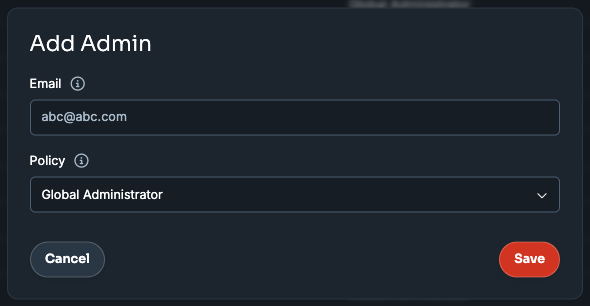
To add a new admin, follow the steps below:
- Navigate to User Management > Add Admin.
- Enter the email address you wish to be an admin in the Email field.
- Use the Policy drop-down menu to select the administrator role the user will have.
- Click Save.
All administrators are listed on the User Management page, which displays the admin's email addresses and admin roles. Roles can be edited, and admins can be deleted from this list using the pen and trash icon.