Defend will integrate with your organization's email system to process and analyze emails before delivery to users. Defend requires Microsoft Exchange mail flow rules and connectors to redirect mail flow to the Defend service, where it is processed and sent back to the customer tenant before delivery to the users. All emails sent between Defend and Microsoft 365 are encrypted with TLS.
This guarantees all emails are analyzed before reaching a user's inbox.
See the diagram and steps below for how an email is handled alongside Defend.
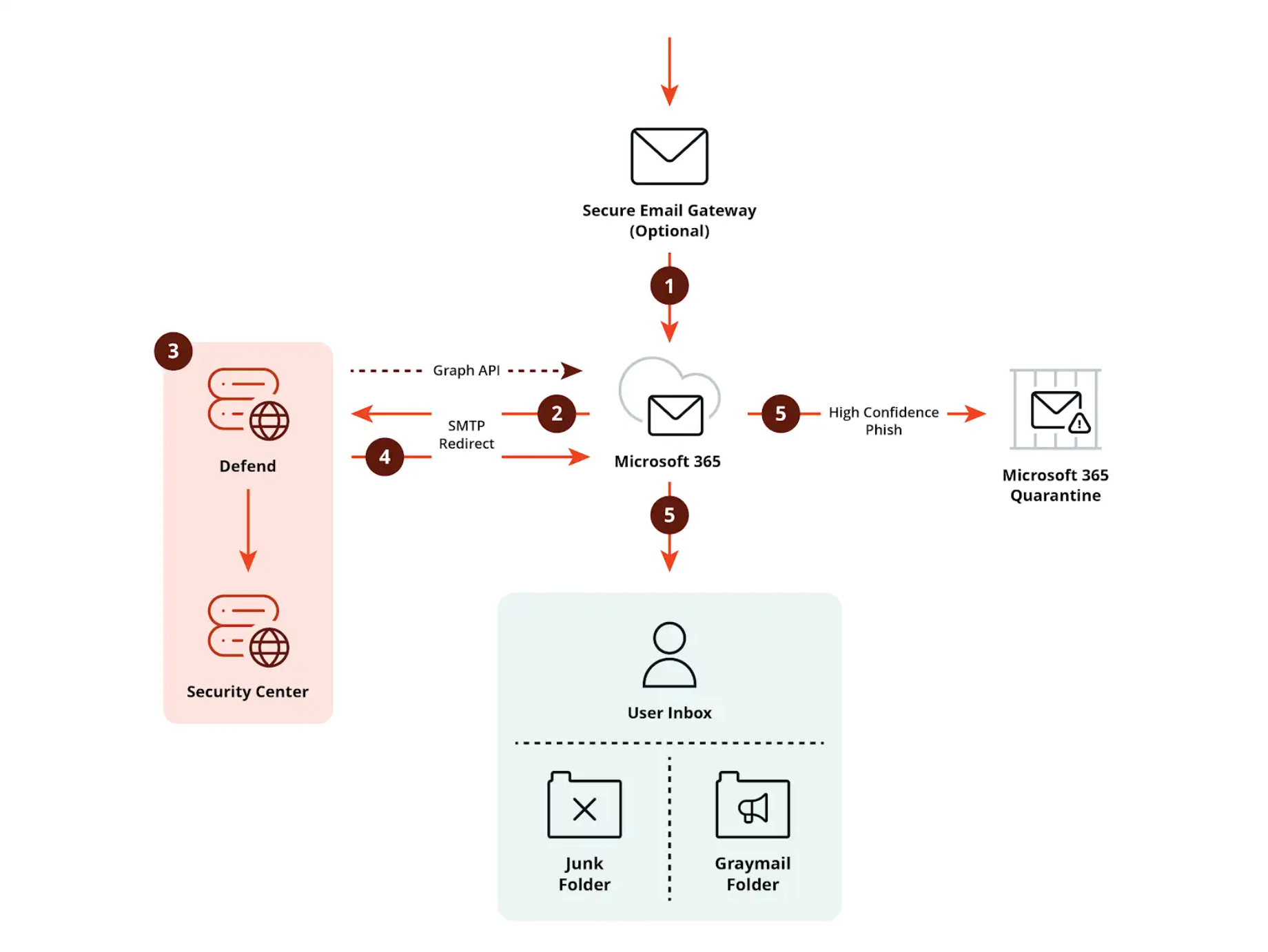
- An email enters a customer’s mail exchange (MX) record and is checked for spam, phishing, and malware by a Secure Email Gateway (SEG) or Microsoft 365.
- Mail flow rules in Microsoft 365 redirect the email via a connector to Defend.
- Defend analyzes the email, adds the required banners, and performs optional URL rewriting. All analysis results are logged in the Defend admin console.
- The email is returned to Microsoft 365 using a connector.
- If Defend classifies an email as a high-confidence phish, we recommend sending it to Microsoft 365 quarantine. All other emails will be sanitized and delivered to the user’s inbox with the required Defend banners.