Many phishing attacks utilize the same or similar content and templates. In the Defend console, you can use the Operations tab to remediate dangerous emails from user inboxes or restore previously remediated emails if they are found to be safe.
The Email Match Confidence score can be used to remediate or restore all exact matches and similar emails.
Remediate Phishing Emails
Remediation allows you to remove malicious emails from one or multiple user inboxes simultaneously. To remediate emails, follow the steps below:
- Log in to the Defend console.
- Navigate to the Recent Emails tab.
- Select the phishing email you wish to remediate.
- Select the Operations tab.
-
Use the Threat Remediation property filters to find exact or similar matches. The Email Match Confidence score decreases as you deselect the property filters.
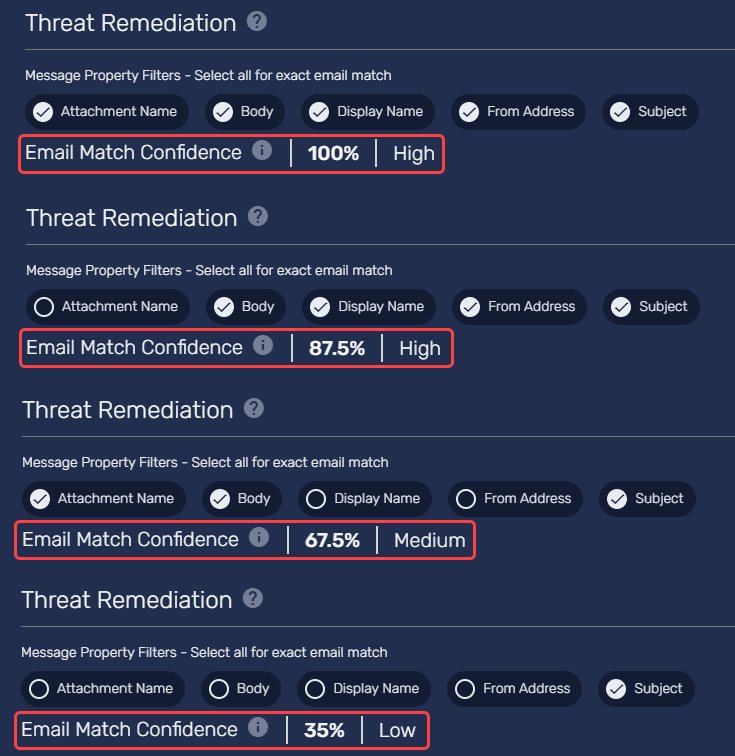
- Identify and select the emails you wish to remediate.
- Select Remediate Selected Emails.
When you remediate emails, you will have the option to receive a notification if remediation fails or automatically set the remediation status to Completed—Phish upon successful remediation.
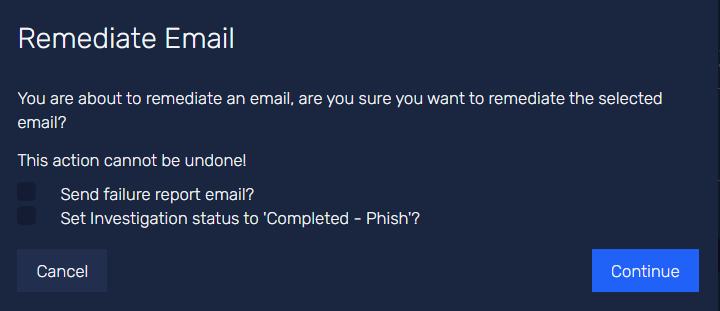
Restoring Remediated Emails
Previously remediated emails can be restored and returned to the user’s inbox. This restore functionality applies to both manual and auto remediations. To restore emails, follow the steps below:
- Log in to the Defend console.
- Navigate to the Recent Emails tab.
- Select the remediated email you wish to restore.
- Select the Operations tab.
- You can choose to restore specific emails or all emails that match the current criteria.
Considerations
The ability to restore depends on your Defend system deployment type and the location of the remediated email or the mechanism used to remediate the email. The possible Defend deployment types are Post-Delivery Analysis (SMTP) and Pre-Delivery Analysis (Graph API).
For Post-Delivery Analysis, the ability to restore based on the remediation mechanism is highlighted below.
| Remediation Mechanism | Restore Supported? |
|---|---|
| Remediation initiated from the Operations tab | Yes |
| Pre-Delivery Quarantine setting used | No |
| Post-Delivery Quarantine setting used | No* |
*Restoring may be possible depending on your Microsoft configuration.
For Pre-Delivery Analysis, the ability to restore based on the remediation email location is highlighted below.
| Remediation Email Location | Restore Supported? |
|---|---|
| _Dangeous folder | Yes |
| Junk folder | Yes |
| Deleted Items folder | Yes |
| Recoverable Deletions folder | Yes |
| Recoverable Purges folder | Yes |
| Moved to Microsoft’s Unified Quarantine as Phish | No* |
| Move to Microsoft’s Unified Quarantine as High Confidence Phish | No* |
*Restoring may be possible depending on your Microsoft configuration.