Defend rewrites URLs from inbound emails to scan linked content for security risks using linguistic and contextual analysis.
When visiting a URL from a Defend-protected email, you will be redirected via the Defend portal first. URL links in emails will present as “links.defend.egress.com/…”. This feature is a configurable option. Domains you do not wish to be rewritten can have an exception.
Note:When a URL rewriting exception is configured, the original URL will be displayed to users, but link scanning will still occur. This includes checking for character obfuscation, suspicious domains, domain age, and potential impersonation of trusted organizations.
To add a URL exception, follow the steps below:
- Navigate to URL Rewriting / Decode > URL Rewriting.
- Select Add Exception.
- Enter the URL hostname in the Hostname field.
- Select the Match Subdomains option if required.
- Use the Action drop-down menu to select Disable Link Rewriting or Disable Link Scanning.
- Add an optional comment.
- Select Save.
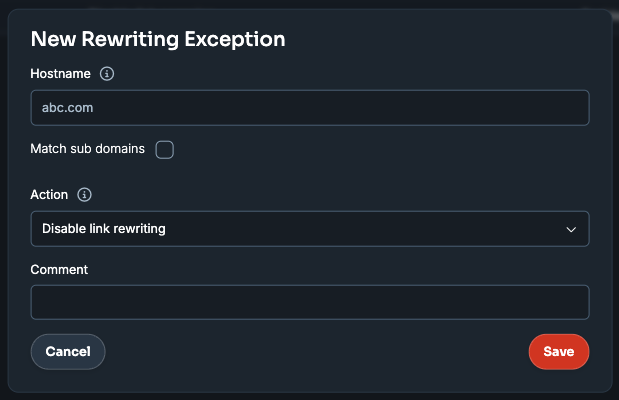
Defend will no longer rewrite links from the specified URL.