This guide is designed for our joint customers using the Defend console and KnowBe4 Security Awareness Training (KSAT) or PhishER consoles. It provides the best practices for optimizing the integration of these consoles to enhance your organization's email security and streamline user experience.
Best Practices for Phish Reporting
Below are some best practices for integrating KnowBe4 products:
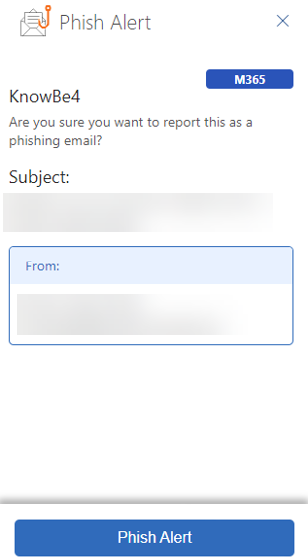
- Use the Phish Alert Button (PAB) for reporting phishing emails:
-
Ensure that all users are utilizing the PAB provided by KnowBe4 to report potential phishing emails. This action helps streamline the process and ensures that all suspicious emails are sent to the correct channels for analysis.
-
- Disable Defend's report button:
- We recommend disabling the report button in the Defend console to avoid confusion and reduce friction for users. This action helps ensure that all phishing reports are consistently managed through the KnowBe4 PAB.
- Retain Defend's Not Phish, graymail and spam option:
- Keep the Not Phish options in Defend active. Not Phish allows users to submit phish to Defend if they think it is a mistake, improving the system's accuracy over time.
- If you are using the graymail and spam detection features, you will still need to enable the reporting buttons, which will allow users to create their preferences regarding what emails are moved to the Graymail and Junk folder.
- Customizable notifications with PhishER:
- If you are using PhishER alongside Defend, take advantage of the customizable notifications feature in PhishER. This action allows you to tailor alerts and communications to fit your organization's specific needs and workflow.
- Unified administration:
- Depending on your organizational structure, you may have separate admins for KnowBe4 and the Defend console, or you might be managing both systems. To leverage their complementary functionalities:
- Consider setting up the same email address for administrative notifications and alerts on both platforms. This action ensures a unified flow of information and helps maintain consistency across systems.
- Within the Defend console, you can filter out the phishing test emails to show only dangerous emails, which can help triage submissions.
- Depending on your organizational structure, you may have separate admins for KnowBe4 and the Defend console, or you might be managing both systems. To leverage their complementary functionalities:
By following these best practices, you can optimize the integrations of KnowBe4 and Defend, streamline user experience, and enhance your organization's email security posture. For further assistance or questions, please contact KnowBe4 support.