From the VirusTotal subtab of your PhishER Settings, you can configure the VirusTotal integration for your PhishER console. VirusTotal is a service that uses over 70 antivirus scanners to inspect and analyze files for malicious content. To integrate your VirusTotal account with PhishER, you must have an active VirusTotal API key. If you do not have a VirusTotal account, you can join for free on VirusTotal's website website (link opens in new window).
KnowBe4 has approval from VirusTotal to integrate with the VirusTotal Public API, which is free. The VirusTotal Public API is limited to 500 requests per day and four requests per minute when running a scan in your PhishER console. For more information, see VirusTotal's VirusTotal API v3 Overview VirusTotal API v3 Overview (link opens in new window) article.
Configuring the Integration
To configure the integration, fill out the fields on the VirusTotal subtab of your PhishER Settings. For more information, see the screenshot and list below:
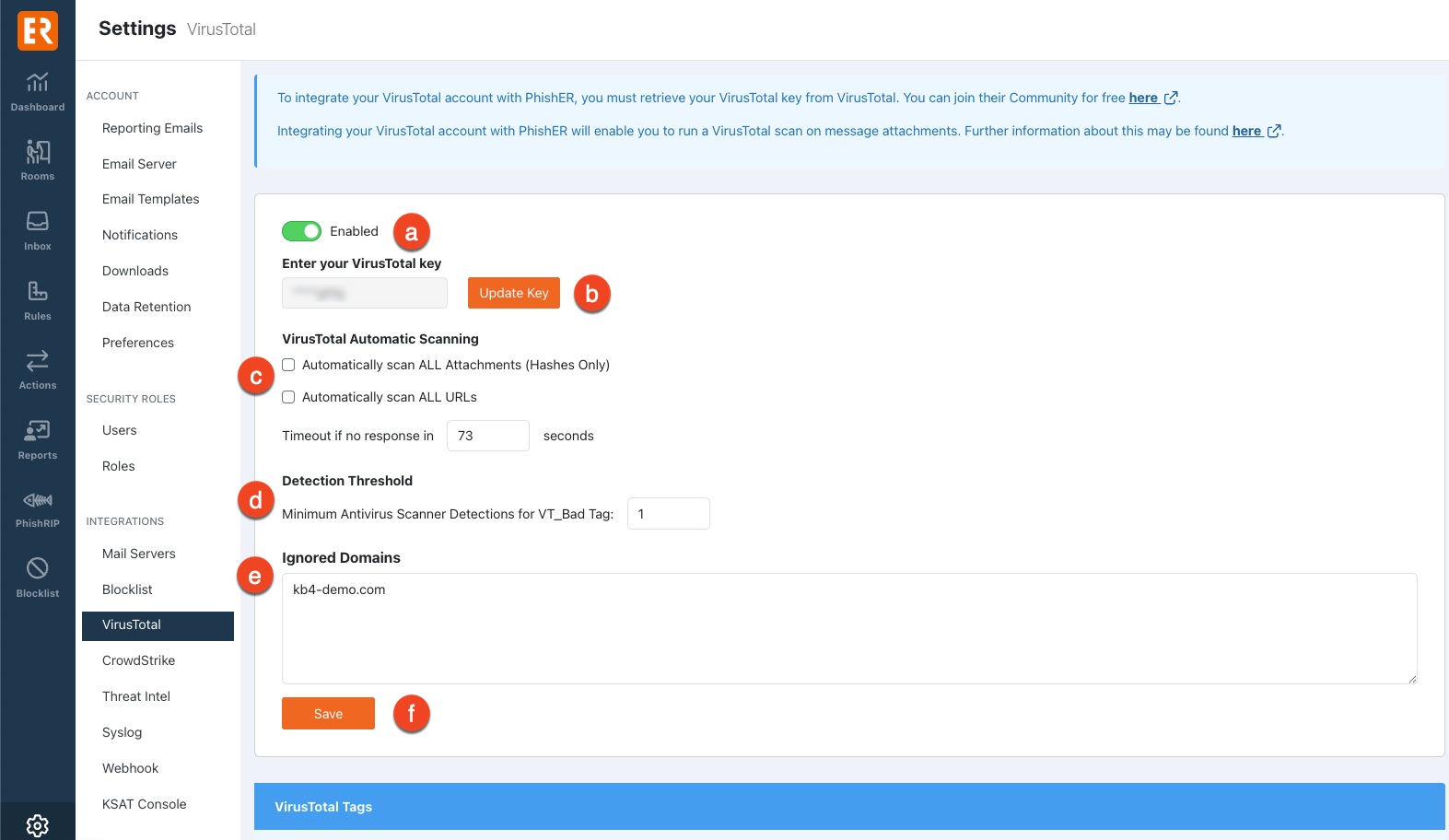
- Disabled or Enabled: Use this toggle to disable or enable the integration.
- Enter your VirusTotal key: Enter your VirusTotal key in this field. For more information, see VirusTotal's Please give me an API key Please give me an API key (link opens in new window) article.
- (Optional) VirusTotal Automatic Scanning: In this section, you can configure settings that allow VirusTotal to automatically scan parts of a message. To learn about these options, see the list below:
- Automatically scan ALL Attachments (Hashes Only): If you select this check box, VirusTotal will receive a hash of all attachments in your PhishER Inbox.
- Automatically scan ALL URLs: If you select this check box, VirusTotal will automatically be sent all URLs in your PhishER Inbox.
- Timeout if no response (seconds): Enter a number of seconds to set a custom timeout period for your VirusTotal scan results. If VirusTotal does not return scan results within this timeout period, a VT_Bypassed tag will be applied to the corresponding message. By default, the timeout period is 120 seconds. To learn more about the tags that can be applied to the message, see the VirusTotal Tags section of this article.
- (Optional) Detection Threshold: In this section, you can set the minimum number of antivirus scanner detections that determine if an attachment or URL is malicious.
- Minimum Antivirus Scanner Detections for VT_Bad Tag: Enter the minimum number of antivirus scanners that must determine an attachment or URL is malicious to trigger the VT_Bad tag to be applied to the corresponding message. By default, this threshold is set to one, and you can set it to a maximum of 50. Updating the setting won’t affect the messages that were already tagged, but future scans will tag any new messages that meet the threshold. If the threshold is set to a number greater than one, and your VirusTotal scan results do not meet this threshold but exceed zero, a VT_Suspicious tag will be applied to the message. To learn more about the tags that can be applied to the message, see the VirusTotal Tags section of this article.
-
Ignored Domains: Enter the domains that you would like VirusTotal to ignore when running a scan. Enter each domain as a new line in the text box. If you add a domain to this list, any subdomains of that domain will be excluded as well. However, if you add a subdomain to the list, the domain will not be excluded. Wildcards (*) and Uniform Resource Identifiers (URIs) are not supported.
Important:For a list of KnowBe4 domains that should not be sent as links or attachments to VirusTotal, see the Excluding KnowBe4 Domains from Scans section of this article. - Save: Click this button to update your VirusTotal integration settings.
Scanning with VirusTotal
Once you integrate your VirusTotal account with your PhishER console, you can run a VirusTotal scan on message attachments and URLs. To run a VirusTotal scan on a specific attachment or URL, click Scan with VirusTotal on the Message Details page.

You can also automatically run a VirusTotal scan against selected messages when you rerun your rules and actions. For more information about these options, see our PhishER Inbox Guide.
VirusTotal assigns one or more tags to your scanned messages to indicate the results of the analysis. To learn more about the tags that can be applied to messages, see the VirusTotal Tags section of this article.
Excluding KnowBe4 Domains from Scans
KnowBe4 uses multiple domains that should not be sent as links or attachments to VirusTotal. You can enter these domains in the Ignored Domains field on the VirusTotal subtab of your PhishER Settings. For a full list of these domains, see the list below:
- kb4.io
- comano.us
- magnetonics.com
- bloemlight.com
- instantrevert.net
- phishing.guru
- phishtrain.org
- malwarebouncer.com
- phish.farm
- microransom.us
- msftemail.com
- compromisedblog.com
- com-onlinebanking.com
- com-token-auth.com
- 2O2.lOl
- protected-forms.com
- cert-sha256.com
- wishyoudidntclickthis.com
- cert-sha256.co.uk
- internalportal.net
- twittermessage.net
- my-cloud-mail.com
- linkedlnu.com
- farenheit.net
- gooqleonline.com
- donotreply.biz
- aøl.com
- exchamge.org
- allibaba.org
- voipmessage.uk
- efaxonline.org
- bltly.us
- twittermessage.co.uk
- www-com.co.uk
- srvgov.com
- gooqle.eu
- allibaba.eu
- yourgunnalovetraining.com
- succesful.org
VirusTotal Tags
In the VirusTotal tags section of the VirusTotal subtab, you can view the tags that VirusTotal can attach to your messages after they are scanned. Based on the scan results, VirusTotal will apply one or more of the tags to your messages. To learn about the VirusTotal tags, see the list below:
- VT_Pending: This tag is attached to your message when a VirusTotal scan is queued. This tag will be removed when the scan is completed.
- VT_Bad: This tag is attached to your message when a VirusTotal scan determines that the attachment is malicious.
- VT_Suspicious: This tag is attached to your message when a VirusTotal scan determines that the attachment or URL is suspicious but is not confirmed to be malicious. You can set the detection threshold for malicious attachments and URLs from your Minimum Antivirus Scanner Detections setting.
- VT_Scanned: This tag is attached to your message when a VirusTotal scan is completed and determined that the attachment is not malicious.
-
VT_Bypassed: This tag is attached to your message when a VirusTotal scan times out. This tag is commonly attached with additional VirusTotal tags. You can set a custom timeout period under your VirusTotal Automatic Scanning settings.
Note:If a VirusTotal timeout occurs, PhishER will allow automated actions to run against the message while the console waits for your VirusTotal results to return. After the automated actions are completed, VirusTotal can finish attaching tags to the message. Automated actions will not run again after the scan results return. - VT_Hash_not_found: This tag is attached to your message when a VirusTotal scan doesn’t return a match for the hashed attachments.
- VT_Ignored: This tag is attached to your message when URLs or domains found on your whitelist are detected in a message.