Our ADI Sync Tool is written in C#, which uses environment variables to access proxy information. This means you must first add the appropriate HTTPS_PROXY variable before you can use Active Directory through a proxy.
Follow the steps below to add the necessary environment variable:
- From your system’s Control Panel, right-click This PC.
- From the drop-down menu that opens, select Properties.

- From the screen that opens, click on Change settings.
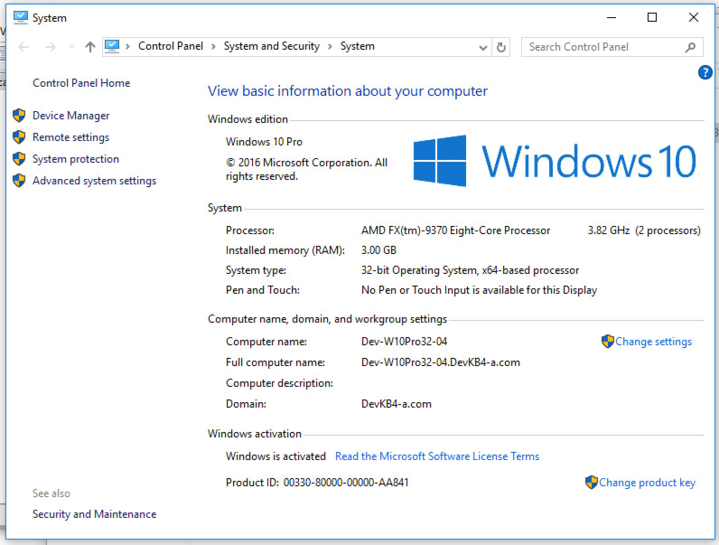
- In the window that opens, click on the Advanced tab.
- Click on Environment Variables at the bottom of the window.

- Under System Variables, click New.
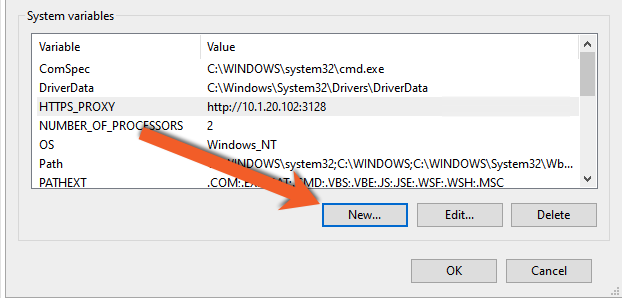
- Add a system variable named HTTPS_PROXY and set the value to specify your IP address and port number in the following format: http://[IPaddress:port] For example:
http://10.1.20.102:3128/
Note: If your proxy server requires a username and password, include the credentials in this syntax:https_proxy = http://username:password@proxy.example.com:8080 - Click OK.
For more information, see this article from Cloud Foundry.